


SUMMARY
Thinking about adding a dedicated Equihash rig to your mining setup? This guide walks you through the full specs, setup process, coin support, profitability estimates, and maintenance tips for one of Bitmain’s newer models built for Zcash and Horizen. We’ll also look at how it stacks up against other machines in the lineup, walk through some real numbers, and cover a few things worth knowing before you buy.
Bitmain Antminer Z15K Worth Considering?
Bitmain Antminer Z15K is one of those newer things added to Bitmain’s Equihash mining group, made kind of for people who want to keep their eyes on Zcash (ZEC) and Horizen (ZEN), not on the SHA-256-style coins like Bitcoin. The device runs the Equihash algorithm, and it can push up to 525 KSol/s in terms of maximum hashrate, so it sits in a pretty good place for miners looking for steady output without jumping straight to the most expensive top-tier models you see around.
What sets this crypto miner hardware apart isn’t just raw speed. It’s the balance between output and manageable power draw. At 2483W of power consumption, the Z15K isn’t the lightest machine on your electricity bill, but it delivers an efficiency rating of 4.73 J/KSol, which is respectable for this class of Equihash miner. For anyone who has spent time researching ASIC miner options, you know efficiency numbers matter just as much as raw hashrate, sometimes more, depending on your local power rates.
The build seems pretty compact for what kind of performance it is actually giving. At 133 x 245 x 290mm and roughly 9kg, it doesn’t really eat up a ton of space in a mining rack or inside a container, you know. Two built-in fans help keep it cool, but coming in at 72 dB, it is not exactly a quiet machine. This is standard for most ASIC units at this power level, so if you’re planning home mining, you’ll want a dedicated space away from living areas.
Here’s a quick rundown of why miners are paying attention to this model:
- It’s purpose-built for Equihash coins, not a general-purpose repurposed unit
- The hashrate-to-price ratio is competitive against other mid-tier Equihash miners
- It supports two coins directly, Zcash and Horizen, giving miners flexibility to switch based on profitability
- It uses a standard Ethernet interface, making setup straightforward for anyone who has configured a miner before
- It ships with practical operating specs (200-240V voltage, 5-45°C operating temperature) that fit most standard mining facilities
For miners who’ve been watching the Equihash space, this release fills a gap between entry-level machines and the more expensive Z15 Pro. It’s a solid middle-ground option if you want serious hashpower without paying flagship prices. Later in this guide, we’ll compare it directly against other models so you can see exactly where it lands in terms of value.
One more thing worth noting: because this is a specialized Equihash miner, it won’t mine Bitcoin or other SHA-256 coins. If you’re a miner who wants to diversify across multiple algorithms, you’d need to pair this with a separate crypto miner running a different chip type. But if you are looking to mine Zcash or Horizen, then this computer is built precisely for that purpose, and that is one of the reasons why it is an effective piece of equipment.
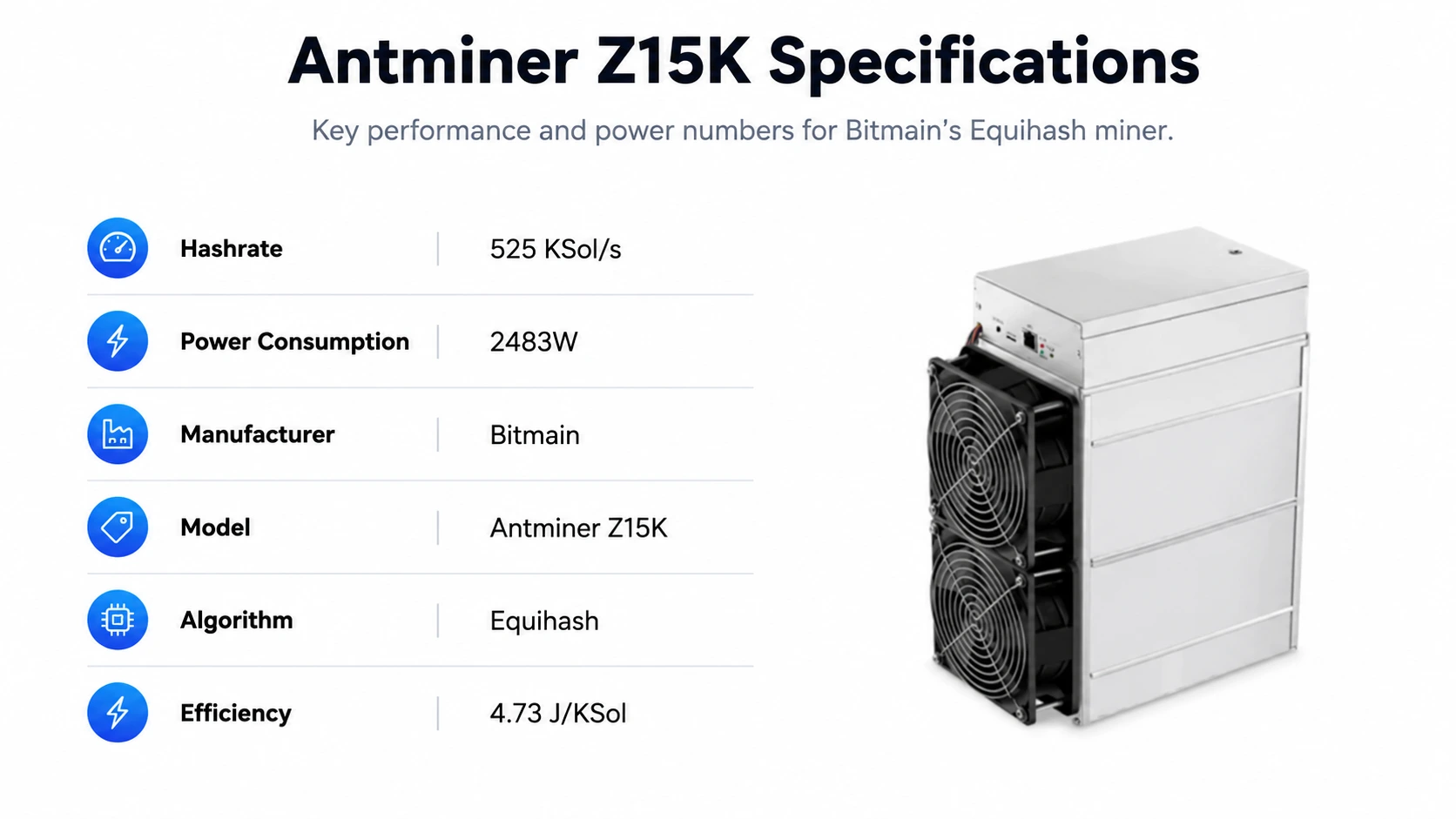
What Are the Full Technical Specifications of the Antminer Z15K?
Before buying any ASIC miner, you need to know the hard numbers. The specs give you all the information regarding the performance of the machine in your system, the electrical system that would be required, and the space that would be available.
Here’s the complete breakdown in table format so you can scan it.
| Specification | Detail |
| Manufacturer | Bitmain |
| Model | Antminer Z15K |
| Algorithm | Equihash |
| Hashrate | 525 KSol/s |
| Power Consumption | 2483W |
| Efficiency | 4.73 J/KSol |
| Size | 133 x 245 x 290mm |
| Weight | 9kg |
| Noise Level | 72db |
| Fans | 2 |
| Voltage | 200-240V |
| Interface | Ethernet |
| Operating Temperature | 5 – 45 °C |
| Storage Temperature | -20 – 70 °C |
| Humidity | 5 – 95% |
Let’s walk through what each of these numbers actually means for you as a miner:
Hashrate (525 KSol/s): This is the machine’s mining speed for Equihash-based algorithms, and, well, it’s basically that KSol/s number. A higher KSol/s figure usually means more mining tries per second, so you get a better shot at making block rewards, or maybe higher pool payouts, depending on how you set up the mining and which pool situation you’re in.
Power Consumption (2483W): This is the power consumption rate of this computer when it is operating at its maximum hash rate. What you want is an electrical configuration that will comfortably cater to this power requirement, along with adequate circuit breakers and wiring that are suitable for long-term use.
Efficiency (4.73 J/KSol): This tells you how much energy the machine uses per unit of hashing power. Lower numbers are better here because it means you’re getting more mining output per watt of electricity. This directly affects your monthly power bill and, ultimately, your profit margins.
Voltage (200-240V): It is most commonly the industrial and some residential setups that can handle this particular voltage range. But you need to double-check that your outlet sockets and power distribution units are rated for such a voltage level.
Operating Temperature (5-45°C): The operating temperature limits that should be followed to avoid overheating or underperforming are represented here. In such hot weather, you need good ventilation or a cooling system.
Interface (Ethernet): A wired connection is standard for ASIC miners because it’s more stable than Wi-Fi and reduces the chance of connection drops that can cost you mining time.
Here comes a legitimate question that often pops up among rookie miners: how does it stack up against a standard setup of a GPU mining rig? In general, GPU rigs operate with a low wattage per piece but need several GPUs to achieve the same hashrate performance. An ASIC miner like this one condenses all of that into a single dedicated unit, which is part of why ASIC hardware has become the standard for serious Equihash mining operations rather than scattered GPU rigs.
If you’re deciding between this unit and something with a smaller footprint, keep in mind that the specs above represent the ceiling of performance. Actual results depend on network difficulty, pool fees, and your own power costs, which we’ll cover in the profitability section below.
Which Cryptocurrencies Can You Mine With the Z15K?
What coins can it mine is one of the most frequent queries from miners interested in using this equipment. This is an easy question to answer since this particular equipment is designed for a specific purpose.
The Antminer Z15K miner is suitable for mining any Equihash cryptocurrency. More precisely, it mines these cryptocurrencies:
- Zcash (ZEC): A coin that emphasizes the aspect of privacy and is also very unique in using the Zero-Knowledge proof technique (zk-SNARKs) to hide the details of the transactions. Zcash mining has been very much welcomed by ASIC miners, as the network is still giving rewards to proof-of-work mining, unlike a lot of other coins which have changed to the proof-of-stake model.
- Horizen (ZEN): A blockchain that concentrates on the aspects of privacy and scalability and adopts a sidechain architecture. Besides its focus on privacy and scalability, Horizen also uses the Equihash hash function, which enables direct mining of this cryptocurrency using the same hardware.
Because both coins share the same underlying algorithm, you don’t need separate machines to mine either one. You simply point your miner at whichever coin’s pool offers better returns at the time, based on price, network difficulty, and block rewards. This flexibility is a genuine advantage of Equihash mining hardware: you’re not locked into a single coin the way some algorithm-specific machines are.
Here’s a simple breakdown of what to expect from each coin as a mining target:
| Coin | Ticker | Focus | Mining Consideration |
| Zcash | ZEC | Privacy transactions | Larger market cap, more established mining pools |
| Horizen | ZEN | Privacy + sidechains | Smaller network, can offer different profitability windows |
For most miners running this machine, Zcash tends to be the primary target simply because of its larger market presence and more mature pool infrastructure. That said, savvy miners often keep an eye on both coins and switch based on which one is paying better at any given time, a strategy sometimes called “profit switching.”
If you’re new to crypto mining, here’s a quick explainer on how the process works with this kind of hardware:
- Your miner solves complex cryptographic puzzles tied to the Equihash algorithm
- Solutions are submitted to a mining pool (or solo, though pool mining is far more practical for individual miners)
- The pool verifies the work and adds it to a share of the total network hashrate
- Rewards are distributed based on your contributed hashrate relative to the whole pool
- Payouts arrive in the mined cryptocurrency, based on the pool’s payout schedule and minimum thresholds
The point to note is that the block reward for mining Zcash follows the same principle of block reward reduction through halving as most of the proof-of-work based cryptocurrencies. In simple terms, the profitability is variable depending on many factors. We’ll get into current numbers in the profitability section coming up, but the takeaway here is that this crypto miner gives you meaningful flexibility across two established coins rather than being a one-trick machine.
How Do You Set Up the Antminer Z15K Step by Step?

Setting up an ASIC miner isn’t complicated, but getting it right the first time saves you headaches down the road. Here’s a practical, step-by-step walkthrough for getting your machine from the box to actively mining.
Step 1: Prepare Your Mining Space
Before you even unbox the machine, make sure your space can handle it. You’ll need:
- A well-ventilated area, ideally with airflow that can dissipate heat generated by 2483W of power draw
- A stable power source rated for 200-240V
- An Ethernet connection or router nearby, since the miner uses a wired interface
- Noise consideration: remember, this unit runs at 72db, similar to a vacuum cleaner running continuously
Step 2: Unbox and Inspect the Unit
Check the miner for any physical damage from shipping. Confirm all components are present, including the power supply unit (PSU), which typically ships included with the miner. Look over the fans and casing to make sure nothing was jostled loose in transit.
Step 3: Connect Power and Network
Plug the PSU into your power source and connect the miner via Ethernet cable to your router or switch. Avoid using extension cords not rated for the load. This machine draws serious continuous power, and using the wrong cabling is a common and avoidable fire risk in home mining setups.
Step 4: Find the Miner’s IP Address
Most Bitmain machines are compatible with IP-reporting tools, or you can check your router’s connected devices list to find the miner once it powers on. This is how you’ll access the miner’s configuration dashboard.
Step 5: Access the Web Interface
Type the miner’s IP address into a web browser to reach its control panel. From here, you’ll configure your mining pool details.
Step 6: Enter Pool Information
You’ll need:
- Pool URL (for example, a Zcash or Horizen pool address)
- Your worker name
- Your pool password (often just “x” for many pools)
Step 7: Set Your Wallet Address
Make sure your pool account is linked to a wallet address where you want your Zcash or Horizen rewards sent. Double-check this address carefully, since mistakes here can mean lost rewards.
Step 8: Monitor Initial Performance
Once configured, give the machine a few minutes to start hashing. Check the dashboard to confirm the hashrate is climbing toward the rated 525 KSol/s. If it’s significantly lower, check your network connection and pool settings.
Step 9: Remote Monitoring Setup (Optional But Recommended)
There are lots of third-party or even Bitmain-made apps available for remote monitoring of uptime, temperature, and hashrate. This becomes particularly important if your mining operation is not located in the place where you live.
Step 10: Create a Maintenance Schedule
Dust removal, fan servicing, firmware updates – all this needs to be done regularly. Maintenance will be discussed separately later in this guide, but just forming the habit of checking everything once per month will help increase the lifespan of your rig.
Following these steps carefully the first time around means fewer surprises later, and gets you mining productively as quickly as possible.
What’s the Real Mining Profitability of the Z15K?
This is the question every miner actually cares about: will this machine make money, and how much? Profitability depends on several moving parts, including your electricity cost, current network difficulty, coin price, and pool fees, but we can walk through realistic numbers based on current performance data.
Using the miner’s rated 525 KSol/s hashrate and 2483W power draw, here’s what a sample profitability breakdown looks like:
| Metric | Daily | Monthly | Yearly |
| Income | $24.52 | $735.57 | $8,949.41 |
| Electricity Cost | -$2.98 | -$89.39 | -$1,087.55 |
| Net Profit | $21.54 | $646.18 | $7,861.85 |
Keep in mind these figures shift constantly. Crypto mining profitability isn’t fixed; it slides around with coin price swings, changes in the overall network hashrate, which then messes with your share of block rewards, and also your local electricity rate. The numbers above assume a moderate electricity cost; if you pay more per kilowatt-hour, your margins will get thinner, and if you can reach cheaper industrial power rates, your returns might be noticeably better.
Here are the main factors that will move your actual numbers up or down:
- Electricity rate: This is the single biggest variable most miners can control. Even a small difference in cost per kWh compounds significantly over a full year of continuous operation.
- Pool fees: Most mining pools charge a small percentage fee, typically between 1-3%, which eats into your gross income.
- Coin price volatility: As profits are made using ZEC or ZEN, the value of your earnings depends on the coin’s market price.
- Network difficulty: The more hash power is connected to the network of Zcash or Horizen, the lower the amount of profits you will receive per block despite the same machine performance.
- Uptime: In case your mining computer does not work for some reason, your profits would go down.
Here’s a practical tip: before you commit to this machine, take a moment and run your own numbers using your actual local electricity rate, not just published estimates that might be kind of generic. Using a profitability calculator where you can enter your own kWh cost will show a way more precise picture of what you might expect from month to month.
It’s also worth setting realistic expectations. Crypto mining is rarely a “set it and forget it” investment; machines need monitoring, coin prices swing, and difficulty adjusts. But for miners focused specifically on the Equihash space, this unit offers a reasonably clear path to consistent returns, provided your power costs are kept under control.
How Does the Z15K Compare to Other Equihash Miners?
Context matters when evaluating any piece of crypto miner hardware. Here’s how this model stacks up against other notable Equihash miners on the market, based on publicly available specs.
| Model | Hashrate | Power | Efficiency | Best For |
| Antminer Z15K | 525 KSol/s | 2483W | 4.73 J/KSol | Balanced mid-tier mining |
| Antminer Z15 Pro | 840 KSol/s | Higher draw | Competitive | Larger operations wanting top-tier output |
| Older Z-series units | Lower KSol/s | Lower draw | Less efficient | Budget-focused or hobbyist miners |
The Z15 Pro pushes a considerably higher hashrate at 840 KSol/s, making it the choice for miners chasing maximum output and willing to pay a higher upfront price along with higher power draw. Older Z-series machines, meanwhile, come in cheaper but with noticeably lower efficiency, meaning you pay more per unit of hashpower in electricity over time.
Where does that leave the Z15K? It sits in a genuinely useful middle position. It’s not the cheapest entry point into Equihash mining, but it’s also far from the most expensive. For miners who want solid performance without stretching their budget to flagship levels, this is often the more sensible buy, since you get strong hashrate and reasonable efficiency without the steepest power bill on the market.
A few practical considerations when comparing models:
- If your electricity cost is low, a higher-hashrate unit like the Z15 Pro may pay for itself faster despite the higher upfront cost
- If you’re mining at a location with moderate to high electricity rates, efficiency becomes more important than raw hashrate, which favors mid-tier units like this one.
- If you’re just getting started and want to test the waters of ASIC mining before scaling up, starting with a single mid-tier unit lets you learn the ropes without a massive capital commitment.
- Bundle discounts are sometimes available when purchasing multiple units, which can improve your overall cost-per-KSol/s if you’re planning a larger deployment.
Ultimately, the “best” machine depends entirely on your specific situation: your power costs, your budget, and how much you’re willing to invest upfront versus operating long-term. This model earns its place by offering a practical, dependable option that doesn’t require flagship-level spending to get meaningful Equihash mining output.
How Do You Maintain and Troubleshoot the Antminer Z15K?
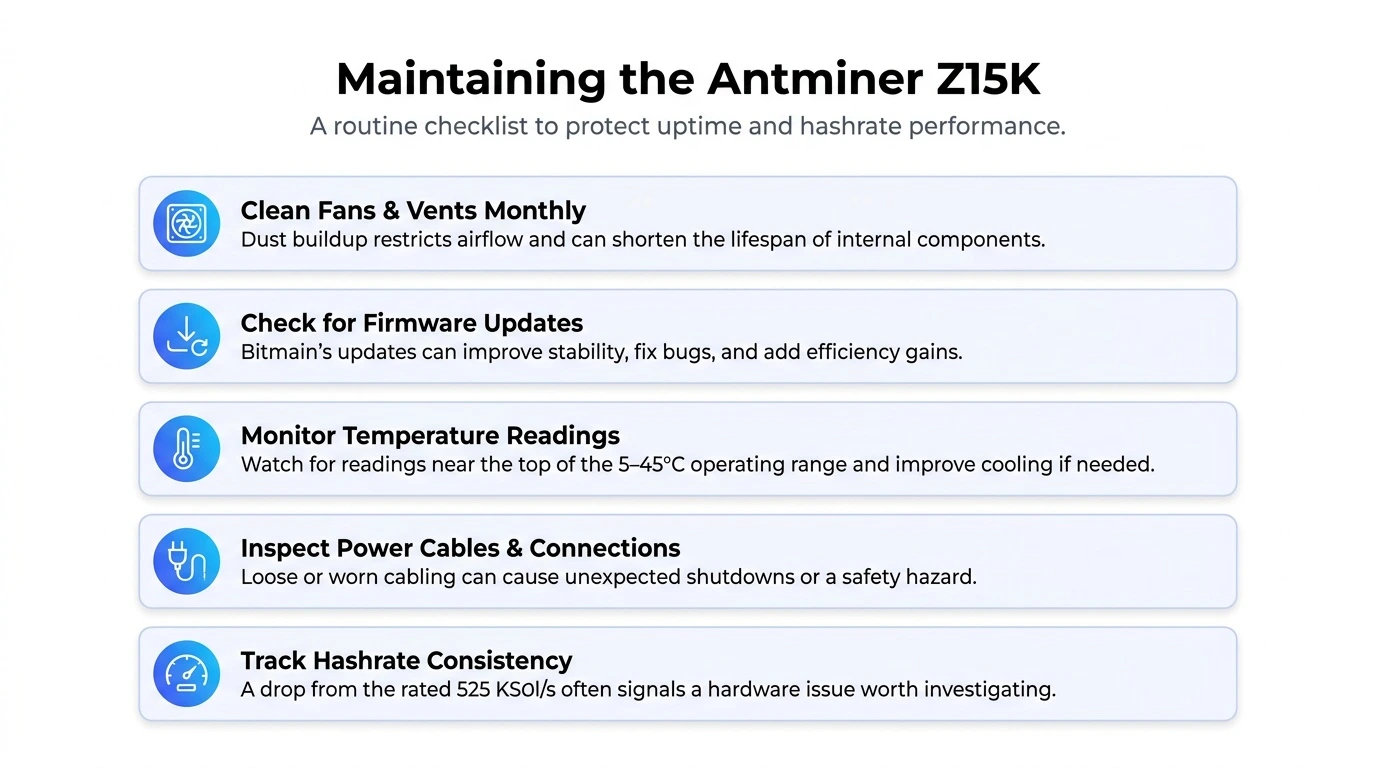
Buying the hardware is only half the equation. Keeping it running smoothly is what actually protects your investment and your profitability over the long run.
Here’s a practical maintenance and troubleshooting guide for day-to-day operation.
Routine Maintenance Checklist
- Clean the fans and vents monthly. Dust buildup restricts airflow and can cause the unit to run hotter than it should, which shortens the lifespan of internal components.
- Check firmware updates regularly. Bitmain periodically releases firmware updates that can improve stability, fix bugs, or add small efficiency gains.
- Monitor temperature readings. If your dashboard shows the unit consistently running near the upper end of its 5-45°C operating range, it’s time to improve ventilation or cooling.
- Inspect power cables and connections. Loose or worn cabling is a common cause of unexpected shutdowns and, in worse cases, a genuine safety hazard.
- Track hashrate consistency. A sudden or gradual drop in hashrate compared to the rated 525 KSol/s often signals a hardware issue worth investigating early.
Common Issues and Quick Fixes
| Problem | Likely Cause | Suggested Fix |
| Miner won’t power on | Loose power connection or faulty PSU | Check cabling, test PSU with another unit if possible |
| Hashrate below rated speed | Overheating or firmware issue | Improve airflow, update firmware |
| Miner not connecting to pool | Incorrect pool URL or network issue | Recheck pool settings and Ethernet connection |
| Excessive noise or vibration | Fan wear or loose mounting | Inspect and clean fans, tighten housing |
| Frequent disconnects | Unstable network or IP conflict | Assign a static IP, check router stability |
When to Consider Professional Repair
If you’ve gone through basic troubleshooting and the miner still isn’t performing correctly, it may be a hardware-level issue like a damaged hash board or chip failure. At that point, it’s worth reaching out to a dedicated ASIC repair service rather than attempting complex internal repairs yourself, especially if the unit is still under any manufacturer or seller warranty.
A few longer-term practical tips for miners running this unit continuously:
- Keep a log of performance metrics so you can spot gradual declines before they become major problems
- Avoid running the miner in enclosed spaces without proper airflow, even if temperatures seem fine short-term
- If you’re running multiple units, stagger maintenance schedules so you’re not troubleshooting an entire fleet at once
- Consider a surge protector or stable power setup, particularly in areas with inconsistent grid power, to avoid damage from power spikes.
Good maintenance habits are honestly one of the most underrated parts of successful mining. A well-maintained unit not only lasts longer but keeps your hashrate closer to its rated performance, which directly protects your profitability over time.
What Are the Pros and Cons of Running This Miner?
Every piece of mining hardware comes with trade-offs, and being upfront about both sides helps you make a smarter buying decision. Here’s a balanced look at where this machine shines and where it falls short.
| Pros | Cons |
| Purpose-built for Equihash coins, so performance is optimized rather than generic | Won’t mine Bitcoin or other SHA-256 coins, so you can’t diversify with this single unit |
| Supports two established coins (Zcash and Horizen) for flexible switching | Power draw of 2483W means a noticeable addition to your electricity bill |
| Reasonable efficiency rating for its performance class | Noise level of 72db makes it unsuitable for shared living spaces |
| Compact footprint compared to older Equihash rigs | Upfront cost is still a meaningful investment for hobbyist miners |
| PSU included, so no separate purchase needed | Requires a dedicated, well-ventilated space to run properly |
| Ethernet interface offers a stable, reliable connection | Ongoing maintenance and monitoring are needed to protect profitability |
Looking at this list, the trade-offs are pretty typical for the ASIC miner category as a whole. Nearly every high-performance mining unit draws serious power and generates real noise, so these aren’t unique weaknesses; they’re the nature of the hardware. What matters is whether the benefits, dependable Equihash performance and coin flexibility, outweigh those operating costs for your specific situation.
If you already have access to a dedicated space with proper airflow and either low-cost or industrial-rate electricity, the cons on this list become far less significant. On the other hand, if you’re planning to run this out of a spare bedroom with average residential power rates, you’ll want to factor in both the noise and the electricity cost more carefully before committing.
How Long Does It Take to Break Even on the Z15K?
Return on investment is one of the most practical numbers a miner can calculate before buying any crypto miner hardware. While exact figures depend on your purchase price, local electricity rate, and market conditions, we can walk through a general framework so you know how to run these numbers yourself.
Using the profitability figures covered earlier, here’s a simplified breakeven estimate:
| Variable | Estimate |
| Approximate unit cost | Varies by seller and batch availability |
| Average daily net profit | Around $21.54 based on current data |
| Approximate monthly net profit | Around $646.18 |
| Estimated breakeven window | Roughly 7-9 months under stable conditions |
Keep in mind this is a simplified model. Breakeven timelines shift depending on a handful of factors:
- Coin price trends: A rising Zcash or Horizen price shortens your breakeven window since your daily earnings in USD terms go up
- Network difficulty increases: As more miners join the network, your share of rewards can shrink, which stretches out your breakeven period.
- Electricity rate changes: Seasonal or regional power price shifts can meaningfully affect your monthly costs
- Downtime: Any period the miner isn’t running is a period without income, so uptime consistency directly shortens or lengthens your breakeven timeline
- Resale value: If you eventually decide to stop mining, recovering some of your investment through resale can offset your effective breakeven point
A practical approach many miners take is running a conservative estimate first, using a higher electricity cost and lower coin price than current market conditions, just to see if the numbers still work in a worst-case scenario. If the machine still turns a reasonable profit under conservative assumptions, that’s a strong signal it’s a sound purchase. If it only works under best-case conditions, it’s a riskier bet.
It’s also worth remembering that breakeven is just the starting point, not the finish line. Once you’ve recovered your initial investment, every month of continued operation is straight profit, assuming the machine stays in good working condition and network conditions remain reasonably favorable.
Is the Z15K a Good Fit for Beginners or Experienced Miners?
Not every ASIC miner suits every type of buyer, so it’s worth thinking honestly about who this machine is actually built for.
For beginners, this unit can be a reasonable entry point into serious crypto mining, but it does come with a learning curve. Unlike GPU rigs, which can sometimes be repurposed for gaming or other tasks, this is a dedicated ASIC unit built for one job. Beginners should be comfortable with basic networking concepts, since setup involves configuring pool details and finding IP addresses through a router. If you’re brand new to mining altogether, it may help to start by reading up on how mining pools work before your unit arrives so you’re not learning everything at once.
For experienced miners, this machine slots in easily as a mid-tier addition to an existing operation. If you already run other Bitmain equipment, the setup process and web interface will feel familiar, and you’ll likely appreciate the balance between hashrate and power draw compared to older models in your fleet.
Here’s a quick self-check to help you decide if this hardware fits your situation:
- Do you have a dedicated, ventilated space away from living areas? If not, plan for that first.
- Can your electrical setup handle a continuous 2483W load? Confirm with an electrician if you’re unsure.
- Are you comfortable monitoring performance and doing basic troubleshooting? If not, budget time to learn or a service to help.
- Is your local electricity rate reasonable for mining? Run the numbers before buying, not after.
- Are you focused specifically on Zcash or Horizen, or do you want flexibility across multiple algorithms? This unit is Equihash-only.
Answering these questions honestly before you buy will save you from a costly mismatch between the hardware and your actual setup.
What Should You Look For When Buying an Antminer Z15K?
Not all sellers offer the same experience, and buying ASIC hardware isn’t quite the same as ordering a regular electronics item. Since these machines represent a meaningful investment, it’s worth knowing what separates a trustworthy purchase from a risky one.
Here are the main things to check before you commit to a purchase:
- Seller reputation: Look for sellers with a track record of shipping genuine Bitmain hardware, verified customer reviews, and clear business information rather than anonymous storefronts.
- Warranty and support: Confirm whether the unit comes with any manufacturer or seller warranty, and understand what that warranty actually covers if a hash board or fan fails early.
- Shipping and batch timing: ASIC miners are often sold in delivery batches tied to manufacturing schedules. Make sure you know the expected shipping window before you pay, since delays are common in this industry.
- PSU inclusion: Confirm whether the power supply unit is included in the listed price or sold separately, since this can meaningfully change your total cost.
- Payment security: Reputable sellers typically offer secure payment options like bank transfer or established cryptocurrency payments, along with clear order tracking.
- Bundle or bulk pricing: If you’re planning to scale up with multiple units, ask about bundle discounts, since buying several machines at once often brings the per-unit cost down.
- Return and refund policies: Understand the process for returns before you buy, particularly how shipping costs are handled if a unit needs to be sent back for any reason.
A few extra practical tips worth keeping in mind during the buying process:
- Avoid deals that seem significantly below typical market pricing for this model, since unusually low prices can sometimes signal counterfeit or non-functional hardware.
- Ask the seller directly about current lead times rather than assuming shipping will be immediate, especially during periods of high demand.
- If you’re buying internationally, factor in potential customs duties and taxes, which can add to your total cost depending on your location.
- Keep records of your order confirmation, payment receipt, and any communication with the seller in case you need to reference them later for warranty or support purposes.
Taking the time to vet your seller properly before purchasing isn’t just about avoiding scams. It also sets you up with better support down the road if you run into technical issues, need replacement parts, or have questions about your specific unit once it arrives.
CONCLUSION
The Bitmain Antminer Z15K gives miners a practical way to mine Zcash or Horizen without jumping straight to the most expensive flagship hardware on the market. With a 525 KSol/s hashrate, reasonable efficiency, and a straightforward setup process, it strikes a fair balance between performance and cost for miners who want dependable results from their crypto mining hardware.
Profitability will always depend on your electricity rate, network conditions, and coin prices, so it’s worth running your own numbers before committing. If you’re ready to explore this machine further or compare it against other ASIC options, Cryptominerbros offers detailed specs, pricing, and support to help you make the right call for your mining setup.
Frequently Asked Questions
-
How much does the Bitmain Antminer Z15K cost?
Pricing varies by seller and current batch availability, so it’s best to check with an active retailer for the latest rate. CryptoMinerBros lists current pricing and stock status for this model.
-
Is the Antminer Z15K profitable in 2026?
Based on current hashrate and power draw, it can generate a net profit of roughly $21 per day under average electricity rates. Actual returns shift with coin price, network difficulty, and your local power cost.
-
What coins can the Antminer Z15K mine?
It’s built for Equihash-based coins, specifically Zcash (ZEC) and Horizen (ZEN). It cannot mine Bitcoin or other SHA-256-based cryptocurrencies.

Join our Newsletter
Get the week’s best cryptomining content in your inbox.

Han su
Han Su is a technical analyst at CryptoMinerBros, a leading provider of cryptocurrency mining hardware. He has over 5 years of experience in the cryptocurrency industry and is an expert in mining hardware, software, and profitability analysis.
Han is responsible for the technical analysis and research on ASIC Mining at Crypto Miner Bros. He also writes in-depth blogs on ASIC mining and cryptocurrency mining, and he has a deep understanding of the technology. His blogs are informative and engaging, and they have helped thousands of people learn about cryptocurrency mining.
He is always looking for new ways to educate people about cryptocurrency, and he is excited to see how the technology continues to develop in the years to come.
In spare time, Han enjoys hiking, camping, and spending time with his family. He is also an avid reader, and he loves to learn about new things.
Similar Blogs

Bitaxe Gamma 602 Review: Specs, Features & Buying Guide
Gamma 602 Bitcoin Miner The Bitaxe Gamma 602 is a compact Bitcoin miner manufactured by Bitaxe, a br...
SHA-256 vs Scrypt Mining: What’s the Difference for ASIC Miners?
SHA-256 vs Scrypt Mining is one of those questions that sounds purely technical until you realize it...
Bitcoin Mining Market Signals: When to Buy, Hold or Upgrade
Learn the key Bitcoin mining market signals to watch before buying, holding, or upgrading your ASIC ... © 2018- Miner Bros Limited. All rights reserved

 EN EN
EN EN  ES
ES