



SUMMARY
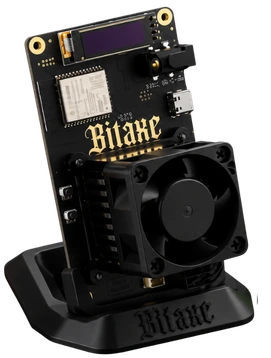
The Bitaxe Gamma 602 packs a single Bitmain BM1370 chip onto a compact ASIC mining board, making Bitcoin mining accessible to home miners and hobbyists. Its power-efficient BM1370 chip offers a hashrate of about 1.2 TH/s at a power consumption of roughly 14 to 18W, making it easy to operate at home. It’s easy to monitor and manage using AxeOS via Wi-Fi. Being an open-source Bitcoin mining ASIC, it’s a great pick for enthusiasts who want to learn about Bitcoin mining ASICs and contribute to SHA-256 ASIC development efforts.
Bitaxe Gamma 602 Review
Bitcoin mining on your own has been made accessible thanks to open-source efforts such as the Bitaxe project. The latest iteration from them, Bitaxe Gamma 602, packs a Bitmain BM1370 chip, which is designed to consume less power, making it ideal for home mining. It comes with a controller and power section alongside the BM1370 chip, all crammed on a single board. It also includes a fan, heatsink, and display, making the package compact enough to fit on a shelf or desk.
The entire Bitaxe project is open-source, which makes it an interesting pick for enthusiasts and hobbyists, including those keen to learn about crypto mining. Unlike commercial ASICs that are black-boxed, the Bitaxe project provides an avenue for people to delve deeper and contribute to development efforts around SHA-256 Bitcoin mining ASICs.
In this Bitaxe Gamma 602 review, we’ll be taking a look at its features, performance, power consumption, noise, efficiency, etc.
Design and Build Quality
The entire package is pretty compact, with a controller and power section alongside the BM1370 chip crammed onto a single circuit board. The compact form factor makes it easier to manage in home setups.
Depending on the vendor, the packaging may differ. The contents of the box can vary across different sellers, with differences including the fan, display, heatsink, power adapter, stand, etc.
Real-World Mining Performance
The Bitaxe Gamma 602 usually runs at around 1.2 TH/s. This is the figure shown by the Bitaxe project and also listed by many sellers. Some vendors advertise slightly higher performance, reaching around 1.3 TH/s. Home Miner Tools also reported getting a steady hashrate close to 1.2 TH/s during regular use.
The actual hashrate can change depending on the miner’s settings and working conditions. Frequency, voltage, chip temperature, firmware version, and cooling setup can all affect its performance.
Power Consumption and Efficiency
In normal use, the Bitaxe Gamma 602 generally consumes around 14 to 18 watts, based on independent owner testing.
This is very low compared with large Bitcoin mining machines. Because of the low power draw, the miner can be used at home without needing a separate high-power electrical connection. A suitable power adapter is usually enough for normal operation.
Cooling, Temperature and Noise
The Bitaxe Gamma 602 allows you to adjust settings such as frequency and core voltage. Increasing these settings can improve the hashrate, but it also increases power consumption and chip temperature.
It is better to watch both hashrate and power use while making changes. This helps you find a setting that gives good performance without putting too much stress on the hardware. Pushing the miner too far beyond its normal settings can cause overheating, especially when using only the standard fan and heatsink.
Home Miner Tools describes the Bitaxe Gamma 602 as very quiet during normal operation. However, the actual noise level can depend on the fan supplied by the seller. Room temperature also matters because a warmer room can increase chip temperature and make the cooling fan run faster.
Setup and Daily Use
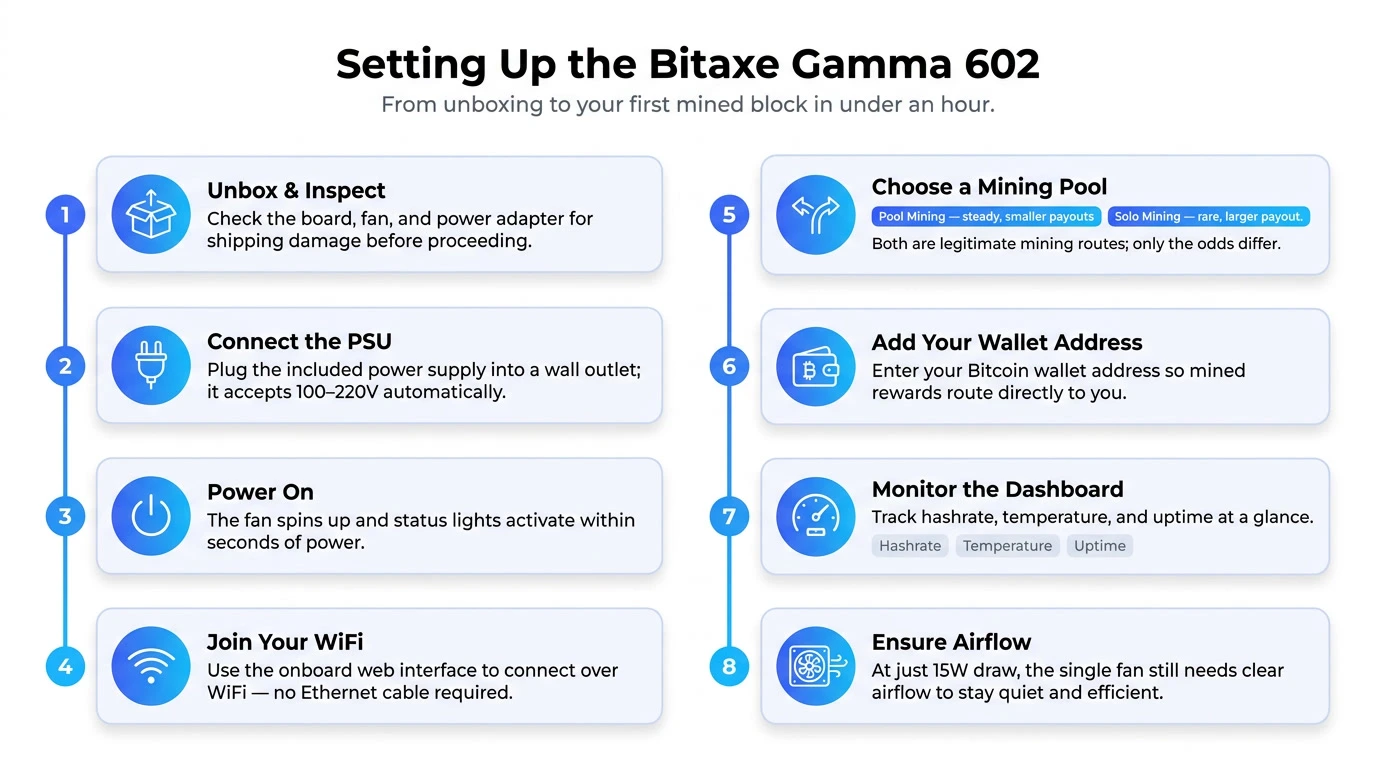
Bitaxe Gamma 602 is a Wi-Fi device, so once you’ve configured the network, it can work on its own without a connected computer.
The main features are accessible via a browser-based AxeOS dashboard, so there’s no need for any special programs either.
Bitaxe Gamma 602 Features
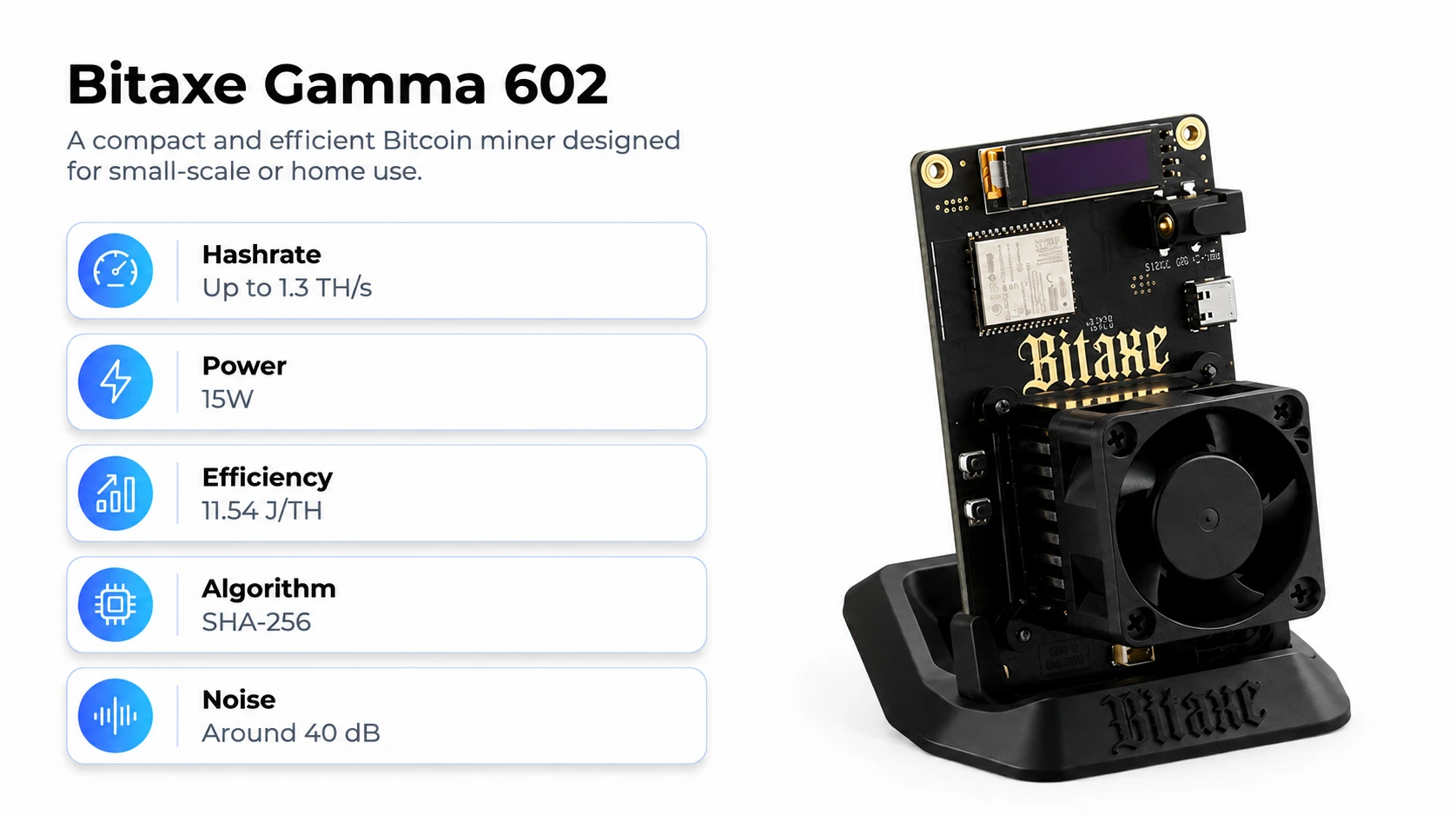
- One BM1370 Bitmain ASIC chip, estimated to have a hashrate of ~1.2 TH/s according to the official Bitaxe project
- Runs on the open-source ESP-Miner firmware
- Supports solo lottery mining
- Very low power consumption and silent operation
- Open-source hardware – schematics are public
BM1370 SHA-256 Chip
The Bitaxe Gamma 602 uses one Bitmain BM1370 chip for Bitcoin mining. Large industrial miners normally use many ASIC chips, but this miner only needs one. According to the official Bitaxe project, the Gamma 602 can reach around 1.2 TH/s of hashrate.
AxeOS Web Dashboard
AxeOS is the browser-based interface used by ESP-Miner. It exposes useful information and controls without requiring special desktop software. Users can view system information, check chip settings, inspect statistics, scan Wi-Fi networks, download logs, restart the device, and apply firmware updates.
The software also supports local hostname discovery on compatible networks, which can make access easier than remembering an IP address.
Wi-Fi and Pool Support
Bitaxe Gamma 602 runs the ESP-Miner firmware, an open-source Bitcoin mining firmware. It can connect to the following types of mining pools:
- Stratum V1
Solo Mining Capability
You can also configure Bitaxe Gamma 602 to mine Bitcoin on its own. Given the device’s modest hashrate, however, it’s extremely unlikely that it’ll manage to find a block. Thus, we suggest treating solo mining on Gamma 602 as a lottery ticket and not having any income-related expectations from this method.
Frequency and Voltage Controls
In addition to the aforementioned, the ESP-Miner firmware lets you fine-tune the ASIC chip’s core voltage and clock frequency, allowing you to lower power consumption or increase hashrate. Be wary, though, as overclocking may result in higher temperatures, and excessive tuning can cause irreparable damage to the device if it’s not properly cooled.
Firmware and Recovery Options
While the process isn’t described in AxeOS, flashing custom or alternative firmware is possible. Similarly, the process of recovering from a botched flash also exists.
Different sellers may bundle various extras with Bitaxe Gamma 602, so please make sure to check the corresponding store’s product page for more information about the contents of the box.
Bitaxe Gamma 602 Buying Guide
Check the Hashrate Claim
For a fair comparison, make sure you’re comparing hashrates measured under the same conditions. The easiest reference point is around 1.2 TH/s, the level we’ve seen from the official projects and community members. Some sellers advertise higher numbers that may be achievable by tuning, but it’s helpful to know if those are stock hashrates or best-case maximums.
Check Power Use and PSU Headroom
Look at both normal consumption and the rating of the included power supply. A miner drawing around the mid-teens does not necessarily mean a 15W adapter is ideal. Extra headroom is useful for startup behavior, tuning, and avoiding an overloaded adapter.
Compare the Cooling Setup
Bitaxe Gamma 602 units have similar boards, but may ship with different fans or heatsinks that affect noise, heat, and tuning headroom. Some may even have different form factors, requiring you to improvise mounting or enclosures. We’ve seen units with similar boards that perform very differently due to cooling. Make sure the cooler included with the miner is suitable for the advertised hash rates. Keep in mind, out-of-the-box cooling should be sufficient to run the unit in default configuration, but may not perform as expected during tuning.
Confirm the Hardware Revision
Make sure you’re looking at a 602 version of the miner, especially if you want to follow along with any of our guides or compare performance. Bitaxe makes a number of similar-looking boards that have different capabilities. Knowing the revision also helps make sure you’re getting accessories that will fit, as well as the correct version of the firmware.
Check Firmware Compatibility
A key feature of Bitaxe is open-source firmware that makes it easy to view statistics, change settings, configure pools, update, and restore the device. Both of the current firmware options, ESP-Miner and AxeOS, make it easy to manage the miner via Wi-Fi in a web browser. While you can always reflash the unit with one of these firmwares, it may be more convenient to buy a unit that ships with one pre-installed, especially if you’re new to Bitcoin mining.
Decide What You Want From It
The Bitaxe is not as powerful as large industrial Bitcoin miners. Its hashrate is much lower, so it is not designed for large-scale mining.
It is better suited for people who want to learn how Bitcoin mining works, test different settings, or try mining at home without using too much electricity.
You can use it for solo mining or connect it to a mining pool. However, with this level of hashrate, the chance of finding a Bitcoin block on your own is extremely low.
Estimate Electricity Cost
The last item to consider is the unit’s operating cost. This will vary depending on local electricity costs. Home Miner Tools estimates the Bitaxe can cost about $1.80 per month to run, assuming $0.14/kWh. This may seem inexpensive compared to other miners, but it’s unlikely you’d make this amount back with a small-scale miner.
CONCLUSION
The Bitaxe Gamma 602 is considered a small learning and participation tool. Overall, it gives 1.2 TH/s performance, low power use, Wi-Fi control, open-source development, pool support, tuning options, and a practical browser dashboard. Those qualities make it appealing to people who want hands-on experience to experiment with mining. CryptoMinerbros can be considered when comparing available packages. The package includes PSU, cooling setup, warranty terms, and the exact board revision before ordering.
If someone mainly wants a small machine for learning, testing settings, and getting experience, the Gamma does that job well.
Frequently Asked Questions
-
Is Bitcoin mining still profitable in 2026?
For large-scale operations with cheap electricity, yes, but for small home miners, the margins are razor-thin. Devices like the Gamma 602 are better suited to learning and solo mining attempts than to steady income.
-
How much does it cost to run a Bitcoin miner at home?
Cost depends entirely on the device’s power draw and your local electricity rate. A low-power unit like the Gamma 602 costs only a few cents a day to run, while larger rigs can cost several dollars a day.
-
What is the cheapest way to start Bitcoin mining?
A compact, low-power ASIC like the Bitaxe Gamma 602 is one of the most affordable entry points, since it costs little upfront and barely adds to your electricity bill. It’s a practical way to learn the basics before investing in bigger hardware.

Join our Newsletter
Get the week’s best cryptomining content in your inbox.

Han su
Han Su is a technical analyst at CryptoMinerBros, a leading provider of cryptocurrency mining hardware. He has over 5 years of experience in the cryptocurrency industry and is an expert in mining hardware, software, and profitability analysis.
Han is responsible for the technical analysis and research on ASIC Mining at Crypto Miner Bros. He also writes in-depth blogs on ASIC mining and cryptocurrency mining, and he has a deep understanding of the technology. His blogs are informative and engaging, and they have helped thousands of people learn about cryptocurrency mining.
He is always looking for new ways to educate people about cryptocurrency, and he is excited to see how the technology continues to develop in the years to come.
In spare time, Han enjoys hiking, camping, and spending time with his family. He is also an avid reader, and he loves to learn about new things.
Similar Blogs
Goldshell SC5 Pro Review: Profitability and Buying Guide
Is the Goldshell SC5 Pro worth buying? Check its latest price, profitability, resale value, key risk...
Why Is Zcash Mining Getting More Competitive?
Zcash Mining: Why Is It Getting More Attention? Zcash mining has turned into one of the more talked-...
BTCB2 Mining and Profitability: What Current Data Suggests
What Is BTCB2 Mining? Mining BTCB2 involves using Blake2b-compatible ASIC hardware for the BTCB2 cha... © 2018- Miner Bros Limited. All rights reserved

 EN EN
EN EN  ES
ES