


SUMMARY
Siacoin mining hardware has come a long way, and picking the right box can mean the gap between a small monthly profit and a quiet loss on your power bill. This guide walks through five Goldshell machines built for the Blake2B-Sia algorithm, compares their specs side by side, and lays out real profitability numbers so you know exactly what to expect before you spend a single dollar.
Blake2b Miners Worth a Closer Look?
Blake2b Miners have become the go-to choice for anyone who wants to mine Siacoin and a few related coins without needing a warehouse full of gear. Unlike Bitcoin’s SHA-256 machines, Blake2B-Sia hardware tends to be smaller, quieter, and cheaper to get started with, which is why hobby miners and small operations both keep circling back to this niche. But “cheaper to start” doesn’t always mean “profitable to run,” and that’s exactly what this article digs into.
We’ll look at five real machines from Goldshell: the SC5 Pro, the SC5 Pro II, the SC Lite, the SC Box II, and the HS Box II, and break down their hashrate, power draw, pricing, and current daily earnings. By the end, you’ll have a clear picture of which unit actually puts money in your pocket and which one is better left on the shelf.
Why Are So Many Hobbyists Turning to Home Mining Setups?
One of the reasons this setup is so attractive is its convenience. Hundreds of rigs operating on a grand scale are unrealistic for an average person, while one small rig kept on a shelf or even in a spare closet is perfectly feasible. There is always a balance to strike between noise, heating, and initial investment versus potential gains for any cryptocurrency miner; Blake2B-Sia is a good choice. You’re not looking at a rig that needs its own dedicated room with industrial exhaust fans; most of these boxes can run quietly in a corner without disturbing anyone in the house.
In addition, the entry cost is much lower from an economic standpoint. When a competing Bitcoin ASIC costs thousands of dollars, certain models mentioned in this guide cost less than $200 each. It allows one to dip their toe into the water and figure out how pool mining works, and then decide if scaling up is worth their while.
What Is the Blake2b Algorithm and Why Does It Matter for Miners?
Blake2b is an efficient hashing mechanism that is faster and requires fewer computer resources than other earlier algorithms. Sia, the decentralized file hosting service, applies a different version of this algorithm known as Blake2B-Sia for its proof-of-work system. Handshake, another blockchain network that allows users to register their domains, also uses the same algorithm in one way or another, hence enabling the mining of the two networks on certain pieces of hardware such as the HS Box II.
So here’s the summary of how all of this impacts you as a potential buyer:
- Blake2b devices are typically smaller and consume less electricity compared to Bitcoin rigs.
- Because there are fewer companies producing equipment for Blake2b, the competition (and thus difficulty) can change very fast after new devices come out.
- Devices from this group usually generate less heat and make less noise, and that will be important to you if you plan on housing them in a garage, extra room, or any other non-server room.
- Making money using Blake2b is directly linked to two factors – the price of the coin and its difficulty.
Which Coins Can You Mine With a Blake2b Miner?
The Blake2b Miner is designed to be compatible with one or more of the below-listed coins based on the model and firmware of the miner:
| Coin | Algorithm Variant | Common With |
| Siacoin (SC) | Blake2B-Sia | SC5 Pro, SC5 Pro II, SC Lite, SC Box II, HS Box II |
| ScPrime (SCP) | Blake2b-Sia | SC Box II |
| Handshake (HNS) | Blake2b-based | HS Box II |
Most home miners stick to Siacoin since it has the deepest liquidity and the most mining pools to choose from. ScPrime and Handshake are usually mined as a secondary option or switched to when Siacoin’s returns dip below a comfortable margin.
What Common Mining Terms Should You Know Before Comparing Machines?
To compare the various hardware options, it would help to first familiarize oneself with several common mining terms:
- Hash rate: This refers to the rate at which the device completes calculations on the mathematical problems in the algorithm. The measurement units are terahashes per second (Th/s) or gigahashes per second (Gh/s).
- Network difficulty: This is a number that changes automatically depending on how much total hashrate competes on the network. Network difficulty is high when individual devices get a low share of the block reward.
- Efficiency (j/Th): It is the number of joules required to produce a terahash per second. Low efficiency j/Th is a good indicator of the performance of your unit.
- Pool fee: A small amount of fees that is charged by the mining pool for allowing you to combine your hashrate with others.
- Block reward: The amount of new coins that is created for the person or pool that mines the blocks, and distributed proportionally among the members of the pool.
- Uptime: The rate at which your hardware is active and mining, without being offline due to any reason like a crash, network drop, etc.
Understanding these terms will definitely make it much easier to understand the specifications tables that appear below, particularly when you begin to compare the efficiency ratios between machines.
What Are the Top Blake2b ASIC Machines Available Right Now?
Below is a rundown of five Goldshell units, all built around the same core algorithm but aimed at different budgets and power setups.
What Makes the Goldshell SC5 Pro 11TH a Mid-Tier Workhorse?

Goldshell SC5 Pro was released in January 2024 and designed for miners desiring substantial hashrate but without resorting to industrial-level hardware. The maximum speed of this mining rig is 11Th/s, whereas its power consumption equals 2820W, meaning that its energy efficiency is about 256.36 j/Th. The weight of this device is about 11.5 kg; it has four cooling fans and comes with a sound level of 80db, such a high level of noise requires placing this rig in a garage or similar area.
Specifications:
| Spec | Detail |
| Manufacturer | Goldshell |
| Hashrate | 11Th/s |
| Power Draw | 2820W |
| Efficiency | 256.36 j/Th |
| Weight | 11.5 kg |
| Noise Level | 80db |
| Fans | 4 |
| Operating Temp | 5–45°C |
| Humidity Range | 5–95% |
| Warranty | 180 days |
| Price | $1,899.00 |
How Does the Goldshell SC5 Pro II 14TH Compare as the Higher-Output Sibling?

The SC5 Pro II is the enhanced edition offered in the same product listing as the SC5 Pro; however, it is worth considering separately, as the increase in hash rate is substantial. It has an upper end of 14Th/s, although at that point, it consumes power up to 3300W. Users interested in assembling a mini mining rig, not one separate device, prefer this edition as the additional hash rate will distribute fixed expenses such as cooling equipment and networking across greater computing power.
Specifications:
| Spec | Detail |
| Manufacturer | Goldshell |
| Hashrate | 14Th/s |
| Power Draw | 3300W |
| Weight | 11.5 kg |
| Noise Level | 80db |
| Fans | 4 |
| Operating Temp | 5–45°C |
| Humidity Range | 5–95% |
| Warranty | 180 days |
| Price | Up to $2,049.00 |
Why Is the Goldshell SC Lite a Budget-Friendly Entry Point?
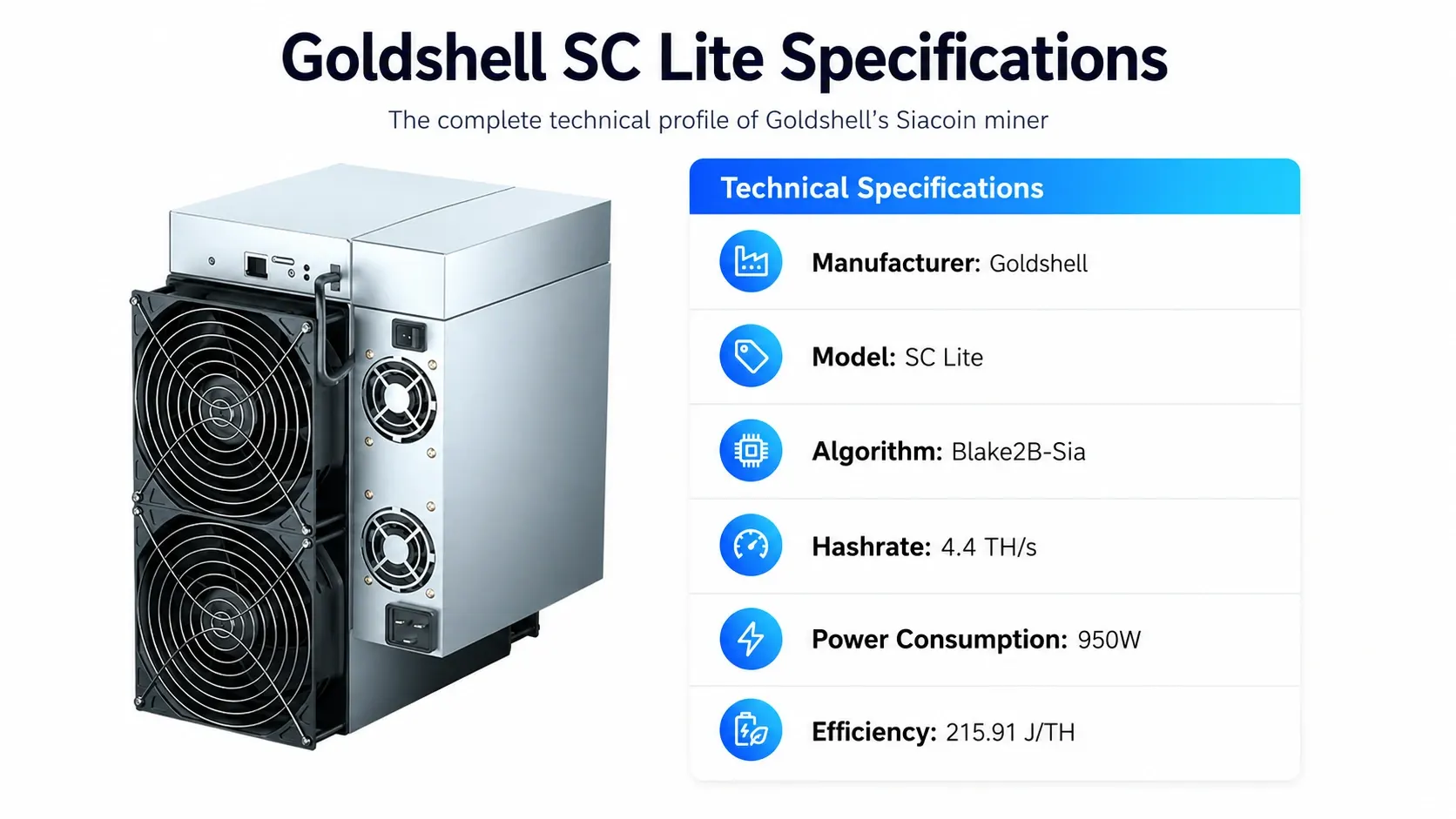
Goldshell SC Lite is worth a hard look if your budget is tight. It runs at 4.4Th/s while consuming 950W, landing at an efficiency of about 215.91 j/Th, actually more efficient per terahash than either SC5 Pro model. Its weight is 9.5 kg; it can operate two fans, and it can make a reasonable amount of noise, which is 55db. Its price of $189.00 makes it the least expensive one of all the units listed here.
Specifications:
| Spec | Detail |
| Manufacturer | Goldshell |
| Hashrate | 4.4Th/s |
| Power Draw | 950W |
| Efficiency | 215.91 j/Th |
| Weight | 9.5 kg |
| Noise Level | 55db |
| Fans | 2 |
| Operating Temp | 5–35°C |
| Humidity Range | 5–65% |
| Price | $189.00 |
Is the Goldshell SC Box II 1.9TH/s a Good Compact Home Option?

The Goldshell SC Box II was released back in February 2023 and remains a popular pick for anyone who wants a compact, desk-friendly unit. It hashes at 1.9Th/s±5% while pulling 400W±5%, giving an efficiency of around 210.53 j/Th, the best efficiency rating of any machine covered here. Also, it is compatible with a low-power setting where it reduces the output to 1.45Th/s while only consuming 260W which will help reduce the cost of electricity, especially when mining at a high rate. Weighing only 2 kg, it is lightweight to place on any shelf, and it operates very quietly at 35db.
Specifications:
| Spec | Detail |
| Manufacturer | Goldshell |
| Hashrate | 1.9Th/s±5% |
| Power Draw | 400W±5% |
| Low Power Mode | 1.45Th/s @ 260W |
| Efficiency | 210.53 j/Th |
| Weight | 2 kg |
| Noise Level | 35db |
| Operating Temp | 0–35°C |
| Humidity Range | 0–65% |
| Price | $519.00 |
What Makes the Goldshell HS Box II a Dual-Algorithm Option?

The Goldshell HS Box II is unique compared to other models in this list because it is able to mine Siacoin and Handshake alternately. For the mining of Siacoin, it has a performance of 1200Gh/s with an electricity usage of 325W while for Handshake it mines at 460Gh/s using 400W of electricity. The model is also equipped with energy-efficient configurations that have a speed of 900Gh/s while using 220W for Siacoin, and a speed of 310Gh/s when using 260W for Handshake. The unit has a weight of 2 kg, emits 35db noise, and is covered by a warranty period of 180 days.
Specifications:
| Spec | Detail |
| Manufacturer | Goldshell |
| Hashrate (SC) | 1200Gh/s @ 325W |
| Hashrate (HNS) | 460Gh/s @ 400W |
| Low Power (SC) | 900Gh/s @ 220W |
| Low Power (HNS) | 310Gh/s @ 260W |
| Efficiency | 869.57 j/Th |
| Weight | 2 kg |
| Noise Level | 35db |
| Operating Temp | 0–35°C |
| Humidity Range | 0–65% |
| Warranty | 180 days |
| Price | $1,199.00 |
How Do These Machines Compare in Full Specs?
The following is the side-by-side comparison table for all five units that brings together the differences:
| Model | Hashrate | Power | Efficiency (j/Th) | Weight | Noise | Price |
| SC5 Pro 11TH | 11Th/s | 2820W | 256.36 | 11.5 kg | 80db | $1,899.00 |
| SC5 Pro II 14TH | 14Th/s | 3300W | ~235.7 | 11.5 kg | 80db | up to $2,049.00 |
| SC Lite | 4.4Th/s | 950W | 215.91 | 9.5 kg | 55db | $189.00 |
| SC Box II 1.9Th/s | 1.9Th/s | 400W | 210.53 | 2 kg | 35db | $519.00 |
| HS Box II (SC mode) | 1200Gh/s | 325W | 869.57 | 2 kg | 35db | $1,199.00 |
A few takeaways jump out here. The SC Box II is the most power-efficient unit per terahash, even though it has the lowest raw hashrate of the Siacoin-only machines. The SC5 Pro II offers the most total hashing power but also draws the most electricity by a wide margin. And the HS Box II trades some efficiency for the flexibility of mining two separate coins on one machine.
Which Machine Delivers the Best Profitability Today?
Profitability numbers change constantly since they depend on coin price and network difficulty, but here’s a snapshot of daily, monthly, and yearly figures for each unit at standard settings:
| Model | Daily Income | Daily Electricity | Daily Profit | Monthly Profit | Yearly Profit |
| SC5 Pro 11TH | $2.74 | -$3.38 | -$0.65 | -$19.40 | -$236.07 |
| SC5 Pro II 14TH | $3.48 | -$3.96 | -$0.48 | -$14.29 | -$173.83 |
| SC Lite | $0.99 | -$1.14 | -$0.15 | -$4.48 | -$54.52 |
| SC Box II 1.9Th/s | $0.48 | -$0.48 | -$0.00 | -$0.00 | -$0.02 |
| HS Box II | $0.18 | -$0.48 | -$0.30 | -$8.99 | -$109.36 |
A quick read of this table tells an important story: raw hashing power alone doesn’t guarantee profit. The SC5 Pro II pulls in the highest daily income of the group at $3.48, but its heavy 3300W power draw eats into that so much that it still lands in the red under standard electricity pricing. Every machine on this list currently runs at a loss at a $0.05 per kWh rate, but the size of that loss varies enormously. The SC Box II sits within a fraction of a cent of breakeven, making it by far the closest thing to a safe hold in this lineup, while the SC5 Pro and SC5 Pro II carry the steepest monthly and yearly losses because of their heavier power draw.
The SC Box II sits right on the edge of breakeven, losing only two cents a year, which makes it the safest hold in this lineup if you’re mining opportunistically or plan to switch it to ScPrime when Siacoin returns soften. The HS Box II figures above reflect its Handshake mode (460Gh/s at 400W), which brings in a small daily income but still isn’t enough to offset electricity costs, meaning it currently makes more sense to compare both coin modes closely before committing to one.
These numbers change along with the market. The value of the coins fluctuates, the mining difficulty changes, and your electricity price becomes more significant than many new miners realize. Check these calculations against your electricity prices before making any purchases.
How Does Your Electricity Rate Change the Profit Picture?
Electricity cost is the single biggest variable most new buyers overlook. The profitability figures above assume a standard residential rate, but your actual results will shift noticeably depending on where you live and how you’re billed.
Here’s a simplified look at how a heavier unit like the SC5 Pro behaves across a few different rate scenarios:
| Electricity Rate | Daily Power Cost (2820W) | Effect on SC5 Pro Profit |
| $0.05/kWh | -$3.38 | Baseline loss |
| $0.06/kWh | -$4.06 | Loss deepens slightly |
| $0.07/kWh | -$4.74 | Loss widens further |
| $0.10/kWh | -$6.77 | Loss widens further |
| $0.14/kWh | -$9.47 | Significant daily loss |
Notice how quickly the numbers move against you as the rate climbs; this is exactly why heavier machines only make sense for miners with genuinely cheap power, such as those with solar setups, industrial rates, or off-peak plans. Lighter machines like the SC Box II or SC Lite are far more forgiving because their smaller power draw means rate increases have a much smaller dollar impact on daily results.
How Does Network Difficulty Affect Long-Term Earnings?
Network difficulty rises and falls based on how much total hashing power is pointed at the Siacoin blockchain at any given moment. When new hardware floods the market or existing miners upgrade their fleets, difficulty typically climbs, which shrinks everyone’s individual share of the block reward, even if you haven’t changed a single setting on your own machine. On the flip side, when older or less efficient machines get shut off because they’re no longer profitable, difficulty can ease, giving remaining miners a slightly larger slice of the pie.
This is worth remembering because the profitability tables in this guide are a snapshot, not a permanent forecast. A machine that’s barely profitable today could slip into a loss next month if difficulty rises, or could become more attractive if it falls. Checking your projected returns at intervals of a few weeks, instead of taking today’s values to be permanent, is one of the easiest practices that can distinguish amateur miners from those who constantly make a profit.
What Mistakes Should a New Crypto Miner Avoid?
There are numerous mistakes that first-time buyers tend to commit, and many of these can be avoided simply by being aware of what not to do:
- Ignoring electricity cost entirely. Buying based on hashrate alone, without checking your own power rate against the unit’s consumption, is the fastest way to end up running hardware at a loss.
- Skipping ventilation planning. Units like the SC5 Pro generate real heat and noise; running them in an enclosed space without airflow shortens component life and can trigger thermal throttling.
- Choosing the wrong pool. Some pools have higher minimum payout thresholds or slower payout schedules, which can tie up small earnings for weeks at a time.
- Not budgeting for replacement parts. Fans and power supplies wear out faster than the main hashboards, so it helps to keep a spare on hand once a unit passes its warranty window.
- Overestimating coin price stability. Siacoin, like most cryptocurrencies, can swing sharply in price. Profitability estimates built on today’s price can look very different a month from now.
- Forgetting resale timing. Selling outdated hardware while it still has reasonable resale value, rather than waiting until it’s obsolete, can recover a meaningful chunk of your original investment.
How Do You Set Up and Run a Siacoin Miner Step by Step?
Getting a Siacoin Miner running for the first time doesn’t take long if you follow a clear sequence. Here’s the process most buyers go through:
- Unbox and inspect the unit. Check for shipping damage, confirm the power supply is included (most Goldshell units ship with one), and make sure all cables are present.
- Pick a mining pool. Popular options include Kryptex, F2Pool, and Luxor. Sign up, create a worker name, and note down the pool’s stratum address.
- Connect to power and network. Plug the miner into a stable power source and connect it to your router via Ethernet; most of these machines don’t support Wi-Fi.
- Find the miner’s IP address. Use your router’s connected-devices list or a network scanning tool to locate the miner on your local network.
- Log into the miner’s web dashboard. Enter the IP address into a browser to access the built-in control panel.
- Enter your pool details. Input the stratum address, your wallet address, and worker name into the mining configuration page.
- Set your fan and power mode. Choose standard or low-power mode depending on your electricity costs and noise tolerance.
- Monitor your first 24 hours. Watch hashrate stability, temperature readings, and rejected shares to confirm everything is running smoothly.
What Practical Tips Help Boost Mining Profits?
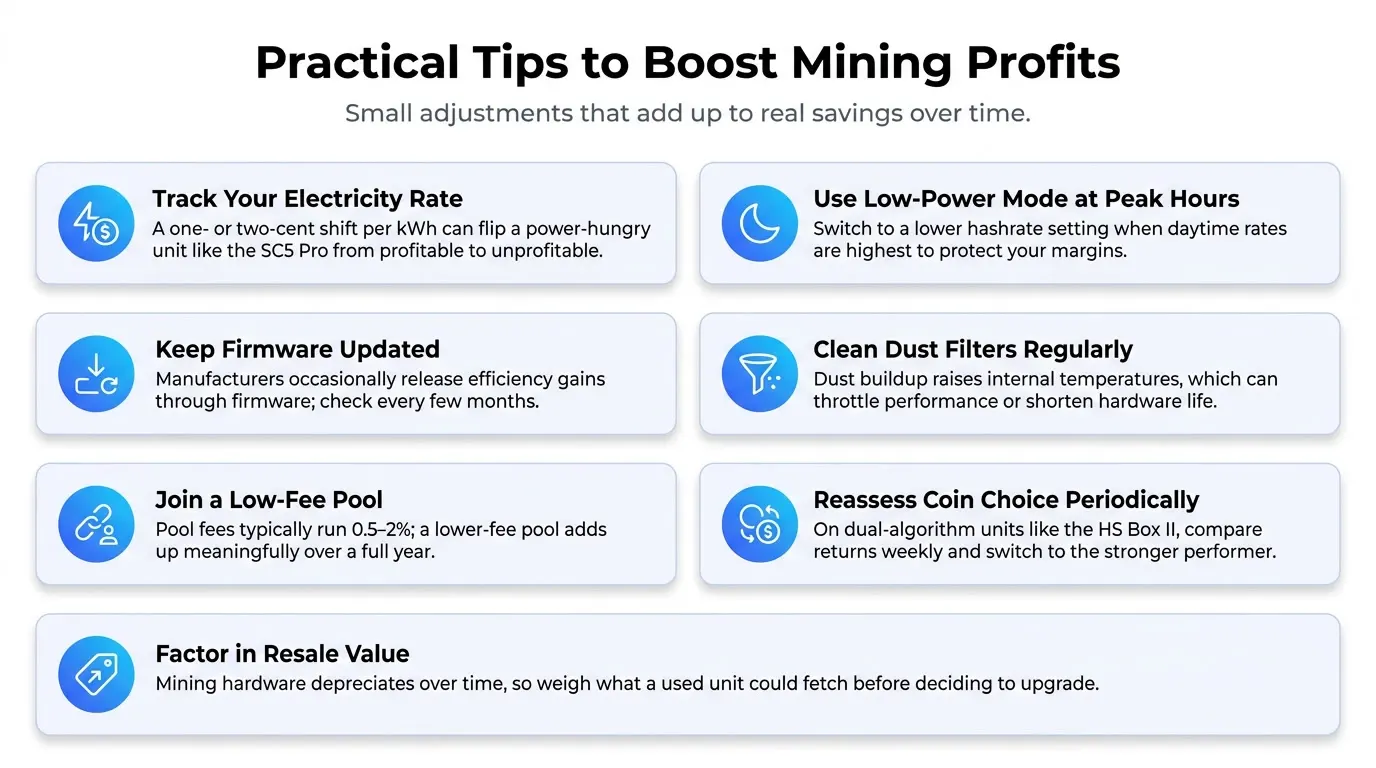
A few small adjustments can make a real difference to your bottom line over time:
- Track your electricity rate closely. Even a one- or two-cent difference per kilowatt-hour can flip a machine from profitable to unprofitable, especially on power-hungry units like the SC5 Pro.
- Use low-power modes during peak-rate hours. If your utility charges more during the day, switching to a lower hashrate setting overnight only can preserve profit margins.
- Keep firmware updated. Manufacturers occasionally release efficiency improvements through firmware, so check for updates every few months.
- Clean dust filters regularly. Dust buildup raises internal temperatures, which can throttle performance or shorten the lifespan of your hardware.
- Join a pool with low fees. Pool fees typically range from 0.5% to 2%, and picking a lower-fee pool adds up over a full year of mining.
- Reassess coin choice periodically. If you own a dual-algorithm unit like the HS Box II, check both Siacoin and Handshake returns weekly and switch when one clearly outperforms the other.
- Factor in resale value. Mining hardware depreciates, so don’t ignore what a used unit might fetch if you decide to upgrade later.
Is Buying an ASIC Miner Still Worth It?
Whether an ASIC Miner still makes sense for you comes down to three things: your electricity rate, your budget, and your patience for market swings. If your power costs are low- think under 8 cents per kilowatt-hour- even the heavier machines like the SC5 Pro can turn a modest profit. If you’re paying closer to the national average or above, lighter units such as the SC Lite or SC Box II tend to hold up better because their smaller power draw leaves more breathing room.
Budget also plays a role that most people underestimate. A $189 machine that barely breaks even still teaches you the ropes of pool mining, dashboard configuration, and firmware management without a huge financial commitment. That experience is worth something if you’re planning to scale up later.
How Long Do Blake2b ASIC Machines Typically Last?
Lifespan is one of the most overlooked factors when weighing a mining purchase, yet it directly shapes whether a machine’s yearly profit or loss actually matters in the long run. Most Blake2b ASIC hardware, including the Goldshell lineup covered in this guide, is rated for somewhere between three and five years of continuous operation before the hashboards start showing meaningful performance decay. That said, the real-world number often comes down to how well the unit is cared for rather than a fixed expiration date baked into the chips themselves.
Why Does Heat Shorten a Miner’s Working Life?
Heat is the single biggest factor working against longevity. Chips that run hot for extended stretches degrade faster, which is part of why the noisier, higher-wattage units on this list, like the SC5 Pro and SC5 Pro II, ship with four fans instead of two. More airflow keeps internal temperatures in a safer range, which in turn protects the silicon from the kind of thermal stress that shortens a chip’s working life. If you’re running a heavier unit in a room without much natural airflow, adding a supplemental fan or improving ventilation can meaningfully extend how long the hardware stays productive.
How Much Does Dust Buildup Really Matter?
Dust is the second major culprit. Every one of these machines pulls air through internal filters or vents to cool the hashboards, and that same airflow drags in household dust, pet hair, and general debris over time. A buildup of dust acts like a blanket over the components, trapping heat exactly where you don’t want it. Wiping down external vents and periodically using compressed air on internal fans, roughly every two to three months for units running in typical home environments, keeps airflow consistent and prevents avoidable thermal stress.
Can Unstable Power Wear Out Your Hardware Faster?
Power quality also plays a bigger role than most buyers expect. Machines that experience frequent power cycling, brownouts, or voltage spikes tend to wear out their power supplies faster than units running on a stable, dedicated circuit. If your area experiences regular outages or voltage fluctuations, pairing your miner with a decent surge protector is a small upfront cost that can prevent a much larger repair bill down the road.
What’s the Difference Between Hardware Lifespan and Economic Lifespan?
It’s also worth separating hardware lifespan from economic lifespan. A machine can still be physically functional after five years, but if network difficulty has climbed and coin prices have shifted, that same hardware might no longer be worth running even though nothing is technically broken. This is especially relevant for the lighter units on this list, like the SC Box II and HS Box II, which have smaller profit margins to begin with. A unit sitting near breakeven today has very little room to absorb a difficulty increase before it becomes a net loss, so tracking both the physical condition of your hardware and its ongoing profitability matters just as much as the initial purchase decision.
How Far Does the Warranty Actually Cover You?
Warranty coverage offers a partial safety net during the early stretch of ownership. Most of the machines in this guide carry a 180-day warranty, which covers manufacturing defects but won’t help with wear from years of continuous use. Once that window closes, budgeting for the occasional fan replacement or power supply swap is a realistic part of owning ASIC hardware long-term, rather than a surprise.
How Do You Choose Between These Five Machines for Your Own Setup?
With five different options on the table, the right pick usually comes down to answering a few honest questions about your own situation:
If your top priority is raw hashrate and you have cheap power: the SC5 Pro II is the strongest performer here, reaching 14Th/s. Just be realistic about the 3300W draw; you’ll want a dedicated circuit and good airflow.
If you want the safest, closest-to-breakeven option: the SC Box II currently stands out as the unit with the smallest gap between income and electricity cost on this list, losing only a couple of cents over a full year. Its low $519 price tag also keeps the financial risk minimal even if returns shift.
If space and noise are a concern: both the SC Box II and the HS Box II weigh just 2 kg and run at a quiet 35db, making them realistic options for apartments or shared living spaces where an 80db unit simply wouldn’t be welcome.
If you want flexibility across two coins: the HS Box II remains the only machine here that can pivot between Siacoin and Handshake, which gives you a built-in hedge if one network’s returns dry up.
If you’re not sure yet and just want to learn the ropes: starting small with an entry-level unit and reinvesting any profit into better hardware later is a reasonable, low-risk way to build experience before scaling up.
What Ongoing Costs Should You Budget for Beyond the Purchase Price?
The sticker price on any of these machines is just the starting point. A realistic budget also accounts for:
- Electricity, obviously, but also any additional cooling costs if you’re running the hardware somewhere that needs supplemental fans or air conditioning during summer months.
- Networking gear. Most of these units need a wired Ethernet connection, so you may need an extra switch or a longer cable run depending on where the miner sits.
- Replacement parts. Fans are consumable items on any ASIC hardware and typically need replacing every one to two years of continuous operation.
- Insurance or coverage. Some homeowners add mining equipment to a rider on their policy, particularly for higher-value units.
- Time. Monitoring dashboards, checking pool payouts, and troubleshooting the occasional dropped connection all take a bit of your attention every week, even if the hardware itself runs mostly unattended.
None of these costs are dramatic on their own, but stacking them against a machine that’s already sitting near breakeven, like the SC Box II, can tip the scale in either direction, so it pays to plan for them upfront rather than being surprised later.
CONCLUSION
Picking the right hardware for Blake2b mining really comes down to matching the machine to your electricity costs and your goals. The SC Box II currently offers the closest thing to breakeven on this list; the SC Lite is a low-risk entry point given its small purchase price, and the SC5 Pro line makes more sense for those with cheap power and room to run louder equipment. The HS Box II remains an interesting option for anyone who wants flexibility between Siacoin and Handshake, even if its current returns are thin.
Before you buy, run the numbers against your own power rate rather than relying on averages, and keep an eye on network difficulty since it shifts these figures often. If you’re ready to compare current pricing and availability across ASIC hardware brands, CryptoMinerbros is a solid place to check stock and see how these units stack up against newer releases.
Frequently Asked Questions
-
Is Siacoin mining still profitable in 2026?
It depends on the machine and your power rate. Most units on this list are running close to break-even or at a small loss at $0.05/kWh right now.
-
Which Goldshell miner is best for beginners?
The SC Lite is the easiest entry point since it costs under $200 and keeps your financial risk low while you learn the ropes.
-
Can one machine mine both Siacoin and Handshake?
Yes, the Goldshell HS Box II switches between both coins, so you can compare returns and run whichever one performs better.

Join our Newsletter
Get the week’s best cryptomining content in your inbox.

Han su
Han Su is a technical analyst at CryptoMinerBros, a leading provider of cryptocurrency mining hardware. He has over 5 years of experience in the cryptocurrency industry and is an expert in mining hardware, software, and profitability analysis.
Han is responsible for the technical analysis and research on ASIC Mining at Crypto Miner Bros. He also writes in-depth blogs on ASIC mining and cryptocurrency mining, and he has a deep understanding of the technology. His blogs are informative and engaging, and they have helped thousands of people learn about cryptocurrency mining.
He is always looking for new ways to educate people about cryptocurrency, and he is excited to see how the technology continues to develop in the years to come.
In spare time, Han enjoys hiking, camping, and spending time with his family. He is also an avid reader, and he loves to learn about new things.
Similar Blogs

Best Bitcoin Miners Under $3,000 (2026): Top ASIC Picks for Home and Small-Scale Mining
The choice of a Bitcoin miner under $3000 will mostly depend on your budget, electricity cost, and s...
Goldshell SC5 Pro Review: Profitability and Buying Guide
Is the Goldshell SC5 Pro worth buying? Check its latest price, profitability, resale value, key risk...
Why Is Zcash Mining Getting More Competitive?
Zcash Mining: Why Is It Getting More Attention? Zcash mining has turned into one of the more talked-... © 2018- Miner Bros Limited. All rights reserved

 EN EN
EN EN  ES
ES