


SUMMARY
NerdMiner Solo Miners have made solo Bitcoin mining more accessible than it used to be. Not long ago, solo mining was mostly linked with giant warehouses full of loud machines running day and night. Regular users had very little room to participate. Now, compact SHA-256 devices let people set up a small miner in a spare room and try their own luck at finding a block. NerdMiner, sometimes written as nerdminer, is part of that shift. These small units plug into a wall outlet and quietly hash in the background for months.
So what’s in this guide? The current NerdMiner lineup, a compact crypto miner family built for hobbyists, broken down by what each model actually costs to run and how those numbers hold up once real electricity rates get factored in. You’ll get specs, noise ratings, power draw, and rough profitability for every model. By the end,d you will understand which unit would be right for your space, budget, and, let’s be honest, your patience, since solo mining is all about patience anyway.
What Is a NerdMiner and Why Do People Use It for Solo Mining?
NerdMiner began as a hobbyist project built on cheap microcontrollers. It’s grown since into a full lineup of small SHA-256 devices. The concept is easy enough: Rather than sharing the pool profits with a bunch of people mining on the Bitcoin network, you use your hash power to mine on the Bitcoin network yourself.
Let’s be honest about it. Solo mining with a small device is closer to a lottery ticket than a paycheck. Your odds of hitting a block with a handful of terahashes stretch out pretty far, further than most people expect. And yet that’s exactly what pulls hobbyists in. It’s cheap to run. It’s quiet enough to sit in a bedroom. And if the dice ever land your way, you walk away with a full block reward plus fees, not some sliver of a pool payout.
Why do people actually buy these things? A few reasons keep coming up:
- Low entry cost. Most units sell for well under $1,000. A couple sits under $300.
- Low power draw. Nothing close to the electricity hogs you’d find at an industrial scale.
- Educational value. A lot of buyers just want to see mining hardware work up close.
- The dream of the block reward. Long odds are still odds. Someone eventually wins.
Before we proceed, a little reality check to remind us that none of these gadgets will replace your earnings. Consider them as a hobby, educational device, or gamble worth taking even when you lose. Let’s now have a look at what is available on the shelves.
How Long Would It Actually Take to Solo Mine a Bitcoin Block?
Vague warnings don’t help anybody. Let’s do actual math. The Bitcoin network runs at roughly 900 EH/s right now, combined. That’s 900,000,000 terahashes per second, every miner on the planet added up. A home device putting out somewhere between 2.5 and 12 Th/s? Barely a rounding error against that number.
This is the quick and easy way to think about it. The probability of a successful block find during any given ten-minute period is proportional to your share of total hashrate in the network. So with a 12 Th/s mining rig, you divide 900 million by 12 and get to a little over 1 in 75 million of finding the next block discovered. And since blocks are found every ten minutes, you can start counting centuries.
A few things can tilt the odds slightly:
- Running multiple units multiplies your network share, though the gain is proportional, not dramatic.
- A 12 Th/s NerdOCTAxe gets you roughly five times the odds of a 2.5 Th/s NerdQaxe+ Hydro, just by pushing more hashpower.
- Big mining farms occasionally go offline during heat waves or power curtailment, and your relative share temporarily grows until difficulty catches up.
None of this alters the fundamental image. This is a game of high risk and high reward, almost like a lottery ticket, but the “lottery ticket” in question is reusable equipment rather than an object to be thrown away after a single draw. Some hobbyists really enjoy this idea. Others would rather have the boring predictability of pool mining, smaller payouts instead of a jackpot. Both are fine. Plenty of buyers actually run their unit on a pool most of the time and just keep the solo dream in the back pocket.
Which NerdMiner Models Are Currently Available for Bitcoin Mining?
Seven active NerdMiner listings, all built around SHA-256 mining. Each one trades off hashrate, power draw, and price a little differently, so there’s a real spread here depending on what you actually want.
Here’s the lineup, quickly:
| Model | Hashrate | Price (USD) | Cooling Type |
| NerdQaxe++ Rev 7 | 4.8 Th/s | $329.00 | Air (dual fan) |
| NerdOCTAxe Rev 3.1 Hydro | 12 Th/s | $799.00 | Hydro |
| NerdOCTAxe Rev 3.1 | 12 Th/s | $529.00 | Air (dual fan) |
| NerdQaxe++ Rev 6.1 | 6 Th/s | $329.00 | Air |
| NerdOCTAxe | 9.6 Th/s | $499.00 | Air |
| NerdQaxe+ Hydro | 2.5 Th/s | $489.00 | Hydro |
| NerdQaxe++ | 4.8 Th/s | $289.00 | Air |
Two things jump out. The NerdOCTAxe Rev 3.1 Hydro Profitability gives you the most hashrate per dollar at $529. And the base NerdQaxe++ at $289 is just the cheapest door in, period. Hydro variants cost more, but you’re paying for steadier thermals if the unit’s running nonstop somewhere warm.
How Do the Specs Compare Across NerdMiner Solo Miners?
Sticker price is not everything. Specifications become more important when we do the calculations ourselves to realize which of the units would be more economical to run. A more expensive unit consuming less energy might turn out to be more economical in annual expenses than an inexpensive one.
Two flagship models had full specs we could verify:
NerdQaxe++ Rev 7
- Hashrate: 4.8 Th/s
- Power consumption: 69.5W
- Voltage: 12V
- Fans: 2
- Noise level: 40 dB
- Connectivity: WiFi 2.4GHz
- Operating temperature: 0–60°C
- Humidity tolerance: 10–90%
- Size: roughly 4.72 x 3.54 x 1.57 inches
NerdOCTAxe Rev 3.1
- Hashrate: 12 Th/s
- Power consumption: 240W
- Chip: BM1370 (8 chips)
- Fans: 2
- Noise level: 40 dB
- Connectivity: WiFi
- Operating temperature: 0–40°C
- Humidity tolerance: 0–95%
Both ship with a compatible PSU in the box. No hunting down a separate power supply. Small thing, but it smooths out the whole unboxing-to-hashing process.
Do the efficiency math (power divided by hashrate), and the Rev 7 comes out around 14.5 watts per terahash. The OCTAxe Rev 3.1 sits closer to 20. That doesn’t make the Rev 7 the winner outright; it just means the Rev 7 leans hard into efficiency at a smaller size, while the OCTAxe trades some of that away for a much bigger hashrate jump, nearly 2.5x more compute for about 3.5x the power.
Same design logic runs through the rest of the lineup. The 2.5 Th/s NerdQaxe+ Hydro is the smallest hasher in the family, built for anyone who wants the quietest, lowest-draw setup possible, even at the cost of a longer shot at a block. The hydro variants of both the Qaxe and OCTAxe lines exist so you can push clocks a little without cooking the chip, since liquid cooling handles sustained heat far better than fans alone, especially somewhere warm.
One more practical note. Noise around 40 dB sits somewhere between a quiet library and a running fridge. Genuinely livable in a bedroom or home office. That’s exactly why these get marketed toward hobbyists instead of commercial buyers.
What Does It Cost to Run a NerdMiner Solo Miner Every Day?
Spec sheets look nice on paper. Your electricity bill is what actually decides whether this stays an affordable hobby or turns into a slow drain on your wallet.
Let’s run the numbers at a common US residential rate of $0.12 per kWh, and check them again against a lower industrial-style rate of $0.07 per kWh.
Daily electricity cost by model (24-hour operation):
| Model | Power (W) | Daily kWh | Cost at $0.12/kWh | Cost at $0.07/kWh |
| NerdQaxe+ Hydro (2.5 Th/s) | ~40W* | 0.96 kWh | $0.12 | $0.07 |
| NerdQaxe++ (4.8 Th/s) | ~70W* | 1.68 kWh | $0.20 | $0.12 |
| NerdQaxe++ Rev 7 (4.8 Th/s) | 69.5W | 1.67 kWh | $0.20 | $0.12 |
| NerdQaxe++ Rev 6.1 (6 Th/s) | ~90W* | 2.16 kWh | $0.26 | $0.15 |
| NerdOCTAxe (9.6 Th/s) | ~190W* | 4.56 kWh | $0.55 | $0.32 |
| NerdOCTAxe Rev 3.1 (12 Th/s) | 240W | 5.76 kWh | $0.69 | $0.40 |
| NerdOCTAxe Rev 3.1 Hydro (12 Th/s) | ~250W* | 6.0 kWh | $0.72 | $0.42 |
*Numbers with an asterisk are estimated from published efficiency ratios for the family, since exact wattage wasn’t listed for every variant. Confirm your actual draw with a plug-in power meter once the unit’s running.
Bottom line: none of these will bankrupt you on electricity. Even the thirstiest one, the OCTAxe Rev 3.1 Hydro, costs under a dollar a day at typical residential rates. That’s the whole appeal here. No $50-a-day power bill as you’d see with a full-size industrial rig.
Monthly cost snapshot (at $0.12/kWh):
- Smallest unit (2.5 Th/s): about $3.60/month
- Mid-range unit (9.6 Th/s): about $16.50/month
- Largest unit (12 Th/s): about $20.70/month
Compare that to a streaming subscription, or a couple of coffee runs. Running a NerdMiner nonstop starts to look pretty low-stakes once you frame it that way.
Is Solo Mining Bitcoin With a NerdMiner Actually Profitable?
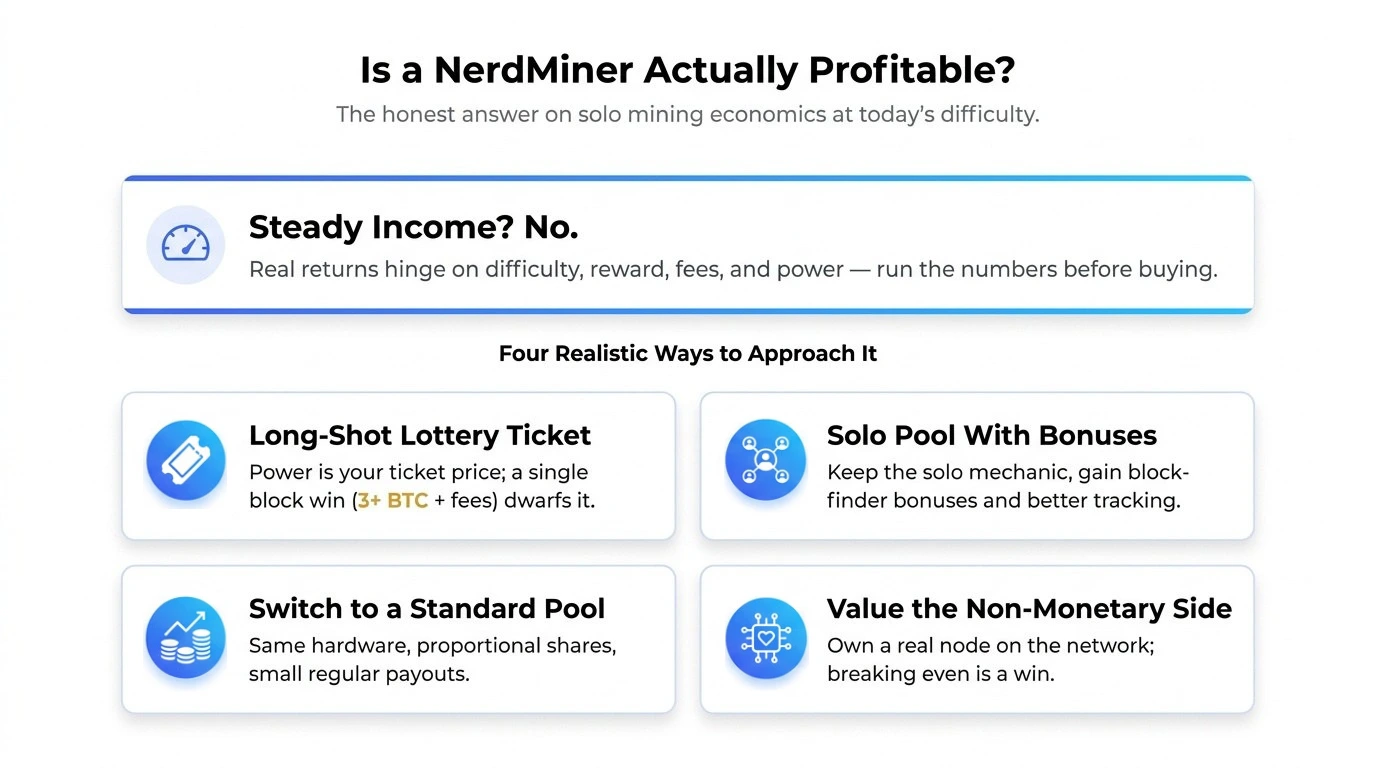
At today’s Bitcoin difficulty level, the probability that a machine with single or low double-digit terahashes is mining a whole block solo is virtually zero. Odds measured in centuries, for one small unit. Not weeks. This isn’t a NerdMiner-specific problem either. Any solo miner at this scale is up against a network hashrate sitting in the hundreds of exahashes.
So, steady income? No. Get-rich-next-week? Also no. But there are a handful of realistic ways people approach the economics:
- Treat it as a long-shot lottery ticket, where the electricity cost is your “ticket price” spread across months or years. Hit a block, and the payout (currently over 3 BTC in subsidy plus fees) dwarfs everything you ever spent on power.
- Join a solo-mining pool that still pays block-finder bonuses. You keep the “solo” mechanic (only get paid if your own hash finds it), but with better stats and payout tracking than running fully standalone.
- Switch to a standard pool if you’d rather see small, regular payouts instead of chasing a jackpot. Same hardware, just proportional shares instead of an all-or-nothing bet.
- Or just value the non-monetary side. A lot of people want a physical device that’s genuinely part of the Bitcoin network. Breaking even on electricity already counts as a win for them.
Want to know how consistent pool income really is? It will be determined by the level of difficulty, the block reward, the transaction fees, and your electricity price, all of which are ever-changing variables. Better to do is plug your particular hashrate and power consumption into an online profitability calculator prior to making any purchase.
Which NerdMiner Solo Miner Model Should You Choose for Your Setup?
Selecting a bitcoin miner depends on the compatibility of the machine with your objectives, available space, and your budget. Here is the guide by use case.
Cheapest entry point: The standard NerdQaxe++ at $289. Lowest price in the lineup, period. Good pick if you just want to dip a toe in without committing much.
Best hashrate-per-dollar: NerdOCTAxe Rev 3.1 at $529, delivering 12 Th/s, the top hashrate in the family, for a mid-range price. This is your pick if you want to maximize your (still small) odds without going hydro.
Noise is your top concern: Every model here runs around 40 dB, but the smaller units, the NerdQaxe+ Hydro and base NerdQaxe++, draw less power and throw off less heat. Less heat usually means less fan noise over time.
Running this somewhere warm, or in an enclosed cabinet? Go hydro. The NerdOCTAxe Rev 3.1 Hydro and NerdQaxe+ Hydro use liquid cooling loops that handle sustained heat far better than fans alone, especially with poor airflow around them.
Want to scale up later? Consider two or three cheaper NerdQaxe++ units instead of one big OCTAxe. Multiple smaller devices spread your risk across more independent solo-mining attempts, and it’s easier to add units gradually as budget allows.
A quick decision checklist:
- Do you have decent ventilation, or does it need hydro cooling?
- What’s your local electricity rate per kWh?
- Solo for the lottery odds, or planning to run a pool eventually?
- Want WiFi setup without running an Ethernet cable?
- Is a compatible PSU included, or do you need to budget separately?
How Does a NerdMiner Compare to a Full-Size Mining Rig?
And worth noting how these tiny little computers compare to the massive ASIC miners that are powering the Bitcoin network. The full-sized computers made by well-known manufacturers normally come in at 100-300+ terahashes per computer, consume 3,000-5,500 watts of electricity, and sell for between $2,000-$10,000 based on their generation. They’re noisy. They require robust electrical systems. They’re designed for those who will be using them by the dozen or hundred in their warehouses, not one individual in a back room.
Side by side:
| Factor | NerdMiner Lineup | Full-Size Industrial Rig |
| Typical hashrate | 2.5–12 Th/s | 100–300+ Th/s |
| Power draw | 40–250W | 3,000–5,500W |
| Noise level | ~40 dB (quiet) | 70–90 dB (very loud) |
| Purchase price | $289–$799 | $2,000–$10,000+ |
| Ideal location | Home, bedroom, office | Warehouse, dedicated facility |
| Primary use case | Hobby, solo lottery, learning | Commercial revenue generation |
| Electrical needs | Standard wall outlet | Dedicated high-amperage circuits |
That gap explains why the two categories exist for completely different people. A commercial operator running a room full of big rigs is playing a volume game, chasing steady pool payouts multiplied across enormous combined hashrate, usually with electricity contracts negotiated well below what homes pay. A hobbyist running one small device is playing a totally different game: low noise, low power draw, and the novelty of touching the network directly instead of chasing real daily income.
Which is also why comparing “profitability” across the two gets misleading fast. A commercial setup can genuinely turn a profit at today’s difficulty and hashprice, assuming access to cheap power and efficient hardware. A single small home device rarely will, not in the traditional sense. Doesn’t make it pointless, just means the value looks different: education, curiosity, a long-shot jackpot instead of a business plan.
So which way should you go? Depends what you actually want. Want to learn how mining hardware works, keep noise and power draw low, enjoy the lottery-style upside? The compact lineup here fits fine. Chasing consistent monthly income at scale? You need a completely different budget, space, electrical setup, and probably industrial power rates to make the math work at all.
How Do You Set Up a NerdMiner for Solo Bitcoin Mining? (Step-by-Step)
Setting one of these up is refreshingly simple next to a full-size ASIC miner rig. Here’s a walkthrough that applies across most of the lineup.
- Unbox and inspect. Check that the miner, PSU, and any cables are all present and undamaged.
- Pick your spot. Decent airflow, away from dust, moisture, and direct sunlight. Running a hydro model? Make sure the tubing has room and isn’t kinked anywhere.
- Hook up power. Plug the included PSU into the miner first, then into the wall. Confirm the PSU’s voltage rating matches your region’s standard household voltage.
- Join WiFi. Most current models run 2.4GHz. Power it on, follow the on-screen or app prompts, and join your home network.
- Point it at a pool or solo endpoint. Enter the stratum address and your Bitcoin payout address, or solo-mining pool credentials if that’s your route. Double, triple-check that payout address before saving. This is not a field to fat-finger.
- Watch it for the first 24 hours. Most units show a small dashboard with hashrate, chip temp, and accepted shares. Watch for thermal throttling that first day.
- Build a maintenance habit. Every few weeks, clear dust off fans or heatsinks, confirm the unit’s still reporting full hashrate. A drop usually means dust buildup or a dying fan.
- Track actual power draw. A cheap plug-in meter tells you what the unit really pulls, which beats trusting the spec sheet once ambient temperature and firmware get involved.
One thing people who’ve run these long-term keep repeating: keep firmware current, since these open-hardware-adjacent devices get regular tuning updates that boost efficiency or fix bugs. And don’t seal the unit into a fully closed cabinet. Even a quiet fan needs somewhere for that hot air to escape.
What Mistakes Should You Avoid When Running a Solo Miner at Home?
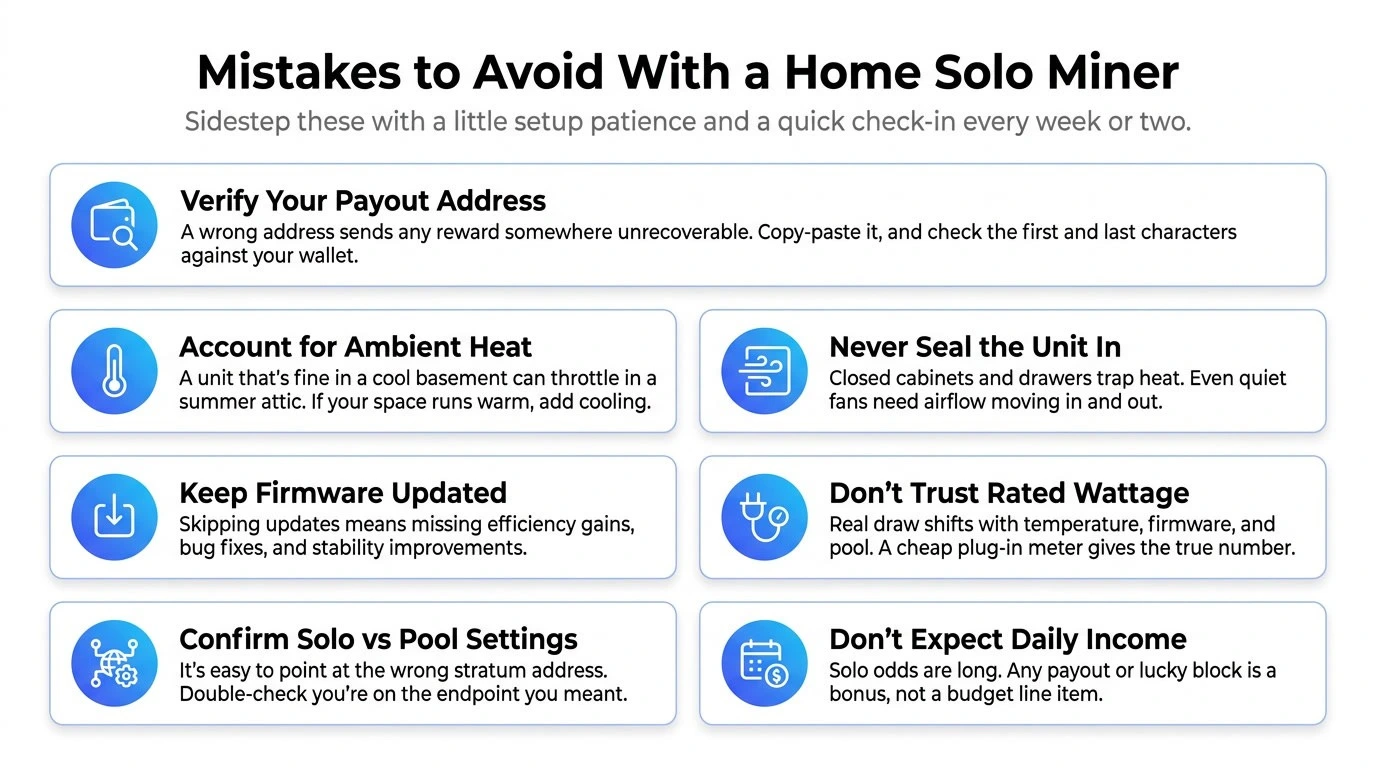
A handful of avoidable mistakes cause most of the frustration people run into. Worth knowing them upfront.
- Skipping the payout address check. Type the wrong Bitcoin address during setup and any reward, however unlikely, goes somewhere you can never touch again. Copy and paste, don’t type it by hand, and check the first and last several characters against your wallet.
- Ignoring ambient temperature. A unit that runs fine in a cool basement can throttle or overheat in an attic during summer. If your space runs warm, lean toward hydro cooling, or just add a small room fan.
- Sealing the unit too tightly. Cram a miner into a closed cabinet or drawer, and heat has nowhere to escape. Even quiet fans need airflow in and out.
- Skipping firmware updates. These devices get regular tuning improvements. Skip updates, miss efficiency gains and bug fixes that affect stability.
- Trusting the spec sheet wattage as gospel. Real-world draw shifts with ambient temperature, firmware version, and pool settings. A cheap plug-in meter gives you the true number instead of a guess.
- Mixing up solo and pool settings. Some setup screens make it easy to point at the wrong stratum address by accident. Double-check you’re connected to the endpoint you actually meant, whether that’s solo or a traditional pool.
- Expecting daily income. Worth repeating one more time: these are hobbyist devices with long-shot solo odds. Any pool payout or lucky block is a bonus, not a budget line item.
Sidestep these with a little patience during setup and a five-minute check-in every week or two, and the devices themselves stay pretty low-maintenance once dialed in. That’s part of why they’ve caught on with people who don’t want a second job managing hardware.
How Profitable Is Each NerdMiner Solo Miner Model?
Numbers matter more than marketing, so let’s run all seven models through the actual math. As of July 2026, the Bitcoin network sits at roughly 900 EH/s total hashrate, with a market “hashprice” of about $29 per PH/s per day, basically what the market currently pays per unit of hash power, and it moves with BTC price, difficulty, and fees. We’ll use that number to estimate what each device could earn on a standard pool, then subtract electricity at two rates: $0.12/kWh (typical US residential) and $0.07/kWh (a lower, industrial-style rate).
One caveat: hashprice shifts constantly, sometimes by a real percentage within a single difficulty epoch, so treat these as a snapshot, not a permanent guarantee.
NerdQaxe+ Hydro — 2.5 Th/s, $489.00
- Estimated daily revenue (pool-equivalent): $0.07
- Daily power cost: $0.12 at residential rates, $0.07 at industrial rates
- Net daily result: roughly breakeven, the closest to flat of any model here
- The quietest, lowest-draw unit in the lineup, so it’s really bought for the experience and the long-shot solo dream rather than steady income.
NerdQaxe++ — 4.8 Th/s, $289.00
- Estimated daily revenue: $0.14
- Daily power cost: $0.20 at residential rates, $0.12 at industrial rates
- Net daily result: small loss at residential rates, close to breakeven at industrial rates
- The cheapest way into the lineup, and the numbers stay close enough to flat that most buyers treat the electricity spent as the cost of playing the solo lottery.
NerdQaxe++ Rev 7 — 4.8 Th/s, $329.00
- Estimated daily revenue: $0.14
- Daily power cost: $0.20 at residential rates, $0.12 at industrial rates
- Net daily result: nearly identical to the base NerdQaxe++, since hashrate and power draw are close
- Slightly pricier than the base model but backed by a verified spec sheet (69.5W), so the extra cost buys certainty rather than better performance.
NerdQaxe++ Rev 6.1 — 6 Th/s, $329.00
- Estimated daily revenue: $0.17
- Daily power cost: $0.26 at residential rates, $0.15 at industrial rates
- Net daily result: modest daily loss at residential rates, close to flat at industrial rates
- A step up in hashrate over the base Qaxe++ for the same price point, making this the stronger pick between the two.
NerdOCTAxe — 9.6 Th/s, $499.00
- Estimated daily revenue: $0.28
- Daily power cost: $0.55 at residential rates, $0.32 at industrial rates
- Net daily result: a clearer daily loss at both rates, since power draw scales up faster than revenue at this tier
- Still a strong hashrate-per-dollar buy if the goal is maximizing solo-mining odds rather than chasing pool profitability.
NerdOCTAxe Rev 3.1 — 12 Th/s, $529.00
- Estimated daily revenue: $0.35
- Daily power cost: $0.69 at residential rates, $0.40 at industrial rates
- Net daily result: the largest daily loss in the air-cooled lineup, roughly $0.05 to $0.34 in the red depending on your rate
- Highest hashrate of any air-cooled model, buying the best solo-mining odds in the family, just not a profitable pool setup.
NerdOCTAxe Rev 3.1 Hydro — 12 Th/s, $799.00
- Estimated daily revenue: $0.35
- Daily power cost: $0.72 at residential rates, $0.42 at industrial rates
- Net daily result: a similar loss profile to the air-cooled Rev 3.1, with the hydro loop adding a bit more draw
- The premium here isn’t better economics, it’s steadier thermals for 24/7 operation in a warm room or tight enclosure.
Here’s the honest summary: at current hashprice, none of these seven models reliably turn a profit if you’re pointing at a standard pool and paying typical residential electricity. The smaller, more efficient units, the NerdQaxe+ Hydro and NerdQaxe++, come closest to breakeven, especially at lower industrial-style rates. The bigger OCTAxe models cost more per day to run than they’d earn from steady pool shares. That’s not a knock on the hardware. It’s just the math of small-scale mining against a 900 EH/s network. The real financial upside for any of these units is the solo block-reward jackpot, not day-to-day pool income, so factor that into your expectations before buying.
CONCLUSION
NerdMiner Solo Miners has carved out a real niche for hobbyists who want a tangible, low-cost crypto miner setup to touch Bitcoin mining without industrial-scale investment. Land on the budget-friendly NerdQaxe++ or the higher-hashrate NerdOCTAxe Rev 3.1, and the running costs stay low enough that this remains a genuinely affordable hobby, not a financial gamble that could actually hurt you. Think about your own priorities before checking out. Quiet, low power draw, cheapest entry point matter most? Go NerdQaxe+ Hydro or the base NerdQaxe++. Want to stack the odds further and don’t mind a bigger footprint and power bill? The NerdOCTAxe Rev 3.1 gives you the highest hashrate in the family. Running the unit somewhere warm, or want the steadiest thermals for true round-the-clock use? The hydro variants earn their extra cost.
Go in with realistic expectations. Solo mining odds at this scale are a long shot, and honestly, the real value for most buyers is the learning experience, the quiet hum of a machine that’s part of the Bitcoin network, and the small thrill of checking the dashboard each morning. Whichever Bitcoin miner you land on, keep expectations tied to reality instead of hype, track your actual power draw once it’s running, keep firmware current, and give the unit room to breathe so it runs cool for the long haul. For anyone shopping around, Cryptominerbros currently lists the full Nerdminer range with specs and pricing laid out for easy comparison.
Frequently Asked Questions
-
Which Bitcoin miner is most profitable?
Among the NerdMiner lineup, the smaller, more efficient units like the NerdQaxe+ Hydro and NerdQaxe++ come closest to breakeven against current hashprice and electricity rates. None are reliably profitable on a standard pool at residential power costs, so the real upside is the solo block-reward jackpot rather than steady income.
-
How profitable is solo Bitcoin mining?
At this hardware scale, solo mining odds are extremely long, with an expected wait measured in centuries for a single small unit against the full network hashrate. It’s best treated as a long-shot bet rather than a source of steady profitability.
-
What is the best solo BTC miner?
For pure hashrate and the best solo odds, the NerdOCTAxe Rev 3.1 (12 Th/s) leads the lineup. For the lowest cost, quietest setup, and easiest entry point, the NerdQaxe++ ($289) is the better pick.

Join our Newsletter
Get the week’s best cryptomining content in your inbox.

Han su
Han Su is a technical analyst at CryptoMinerBros, a leading provider of cryptocurrency mining hardware. He has over 5 years of experience in the cryptocurrency industry and is an expert in mining hardware, software, and profitability analysis.
Han is responsible for the technical analysis and research on ASIC Mining at Crypto Miner Bros. He also writes in-depth blogs on ASIC mining and cryptocurrency mining, and he has a deep understanding of the technology. His blogs are informative and engaging, and they have helped thousands of people learn about cryptocurrency mining.
He is always looking for new ways to educate people about cryptocurrency, and he is excited to see how the technology continues to develop in the years to come.
In spare time, Han enjoys hiking, camping, and spending time with his family. He is also an avid reader, and he loves to learn about new things.
Similar Blogs
ASIC vs GPU Mining: Which Is More Profitable in 2026?
Specialized Bitcoin machines turn each watt into far more hashing than a graphics card can, so they ...
Best Bitcoin Miners Under $3,000 (2026): Top ASIC Picks for Home and Small-Scale Mining
The choice of a Bitcoin miner under $3000 will mostly depend on your budget, electricity cost, and s...
Goldshell SC5 Pro Review: Profitability and Buying Guide
Is the Goldshell SC5 Pro worth buying? Check its latest price, profitability, resale value, key risk... © 2018- Miner Bros Limited. All rights reserved

 EN EN
EN EN  ES
ES